
Key takeaways
- After deploying a client site we checked whether an internal notes file had shipped by mistake. The request came back with a success code, which looked exactly like a leak.
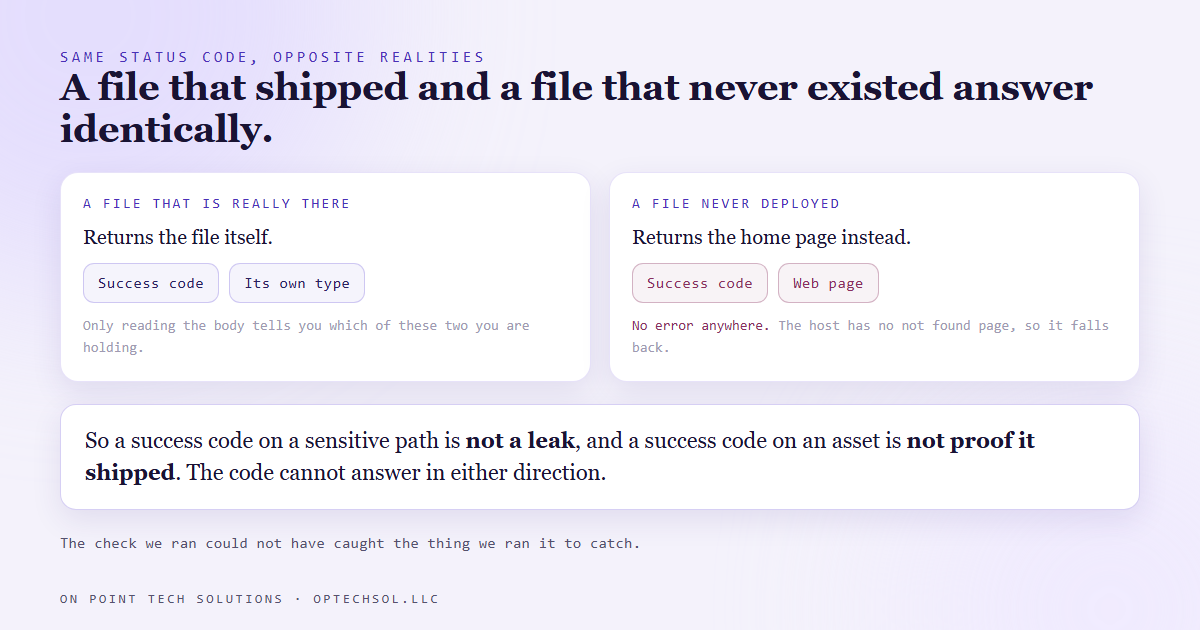
- It was not one. The host answers every unknown address with the home page and a success code, because the project ships no not found page. The status code cannot answer the question in either direction.
- The opposite mistake is the worse one. A success code is also not proof a file is there, so the same check would have told us a real leak was fine.
- Verifying absence is genuinely harder than verifying presence. The only honest method is to fetch the address and search the body for a string that only the file you are worried about contains.
- The real fix is upstream: hand the host a folder containing nothing but the site, so there is nothing to leak and nothing to check.
We build client sites as a folder of files and hand that folder to a static host. It is fast, it is cheap, and it has one property people underestimate: the folder is the site. There is no build step deciding what is public. Everything you hand over is served.
Which is why, after pushing a painting company's new site, somebody asked the obvious question. The working notes for that project, the ones with our pricing thinking and a list of things to confirm with the owner, live in a file. Did that file go up.
So we asked the site for it. It answered with a success code.
The success code meant nothing at all
That looked like a leak, and for about a minute we treated it as one.
It was not. The project ships no not found page, and when a static host has no not found page it falls back to the home page for every address it does not recognise. Success code, home page, every time. Ask for a file that never existed and you get the same answer as asking for one that does.
The proof took one more step. We pulled the body and searched it for a word that appears in the notes file and nowhere on the website. Zero matches, and the body was plainly the home page. Nothing had leaked.
The uncomfortable half of that is what the same check would have done with a real leak. A success code and a body we did not read would have looked identical, and we would have called it clean. The test we ran could not have caught the thing it was run to catch.
Why absence is harder than presence
Proving something is there is easy. Ask for it, read it, recognise it.
Proving something is not there requires you to know how the system answers when it has nothing. Most of us assume that answer is an error, and on plenty of setups it is. On this one it is a success code and a page. On others it is a redirect, or a login screen, or a helpful search results page.
None of those are errors, and every one of them will make a missing file look present.
So the check that works has three parts. Fetch the address. Read the body, and search it for a string only the sensitive file contains. Then check the content type, because a notes file coming back as a web page is the host substituting, not the file being served.
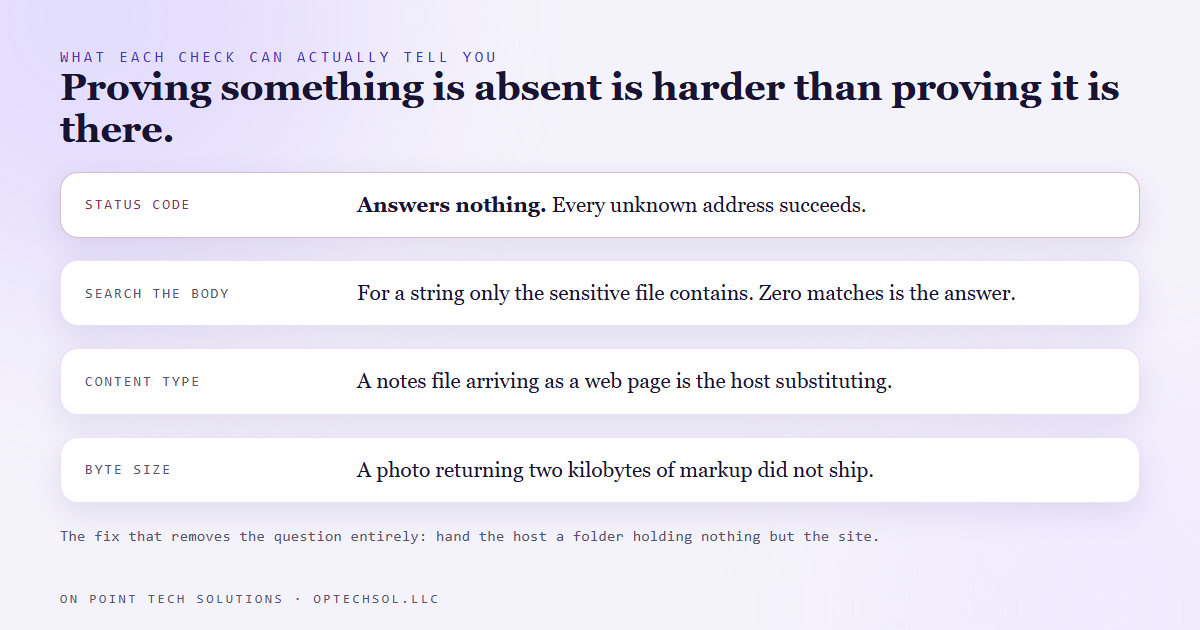
Same discipline in the other direction. To confirm a real asset shipped, check its content type and its size rather than its status. A photograph that comes back as a two kilobyte web page did not ship.
We learned this the expensive way first
This is the gentle version of the story. The ungentle one happened a few weeks earlier.
A spec site we had built for a prospect went live at a preview address, and its folder contained a notes file with our internal pitch reasoning, a list of things to verify with the owner, and that prospect's record id from our CRM. All of it readable by anybody holding the link, and the link was about to be sent to that prospect.
The instinct is to add an ignore file. We did. It made things worse. The host uploaded the ignore file itself as an extra asset and carried on serving the notes.
The instinct after that is to redeploy clean. That does not fix it either. Deployments on hosts like this are immutable, which is a feature: every past deploy keeps its own permanent address and keeps serving exactly what it had. A clean deploy today creates a new one and changes nothing about the old ones. They have to be deleted individually.
And when you delete one, check it with something that defeats the cache, because a deleted deploy keeps answering from cache for a while before it starts refusing. A success code on a deleted address does not mean the delete failed.
What this means for your business
The habit that ends this whole class of problem is not a check. It is a staging folder.
Build your site wherever you like, with whatever notes, drafts, backups and half-finished pages you want beside it. Then copy only the files that belong on the internet into a separate folder and deploy that. Nothing to leak, nothing to remember, nothing to check.
That is how the painting company's site ships now, and it is why the answer to the original question was never in doubt for long.
If you already have sites deployed the other way, do one pass. List what is in the folder, and ask which of those files you would be comfortable handing to the client on paper. That is exactly what you are doing. Then go and look at any past preview address that still works.
Every marketing automation San Jose operators put in front of customers has a public surface, and public means anybody with the link, not anybody you invited. Search engines are not the risk. The link you forward is.
The wider lesson outlives static hosting. When you check whether something bad happened and the answer comes back clean, ask one question before you relax. If the bad thing had happened, would this check have told me.
Want this built for you
We build and deploy client websites with nothing in the folder that does not belong on the internet. Want to build this yourself? Join the On Point Tech Academy. It's free, and we build live every Thursday.
The On Point Tech Academy costs nothing and never asks for a card. We build live every Thursday, 12:30 to 1:30 PT, with whatever AI you use.
Join the Academy free ← Back to all Field Notes