Your call is over. The CRM is already filled in.
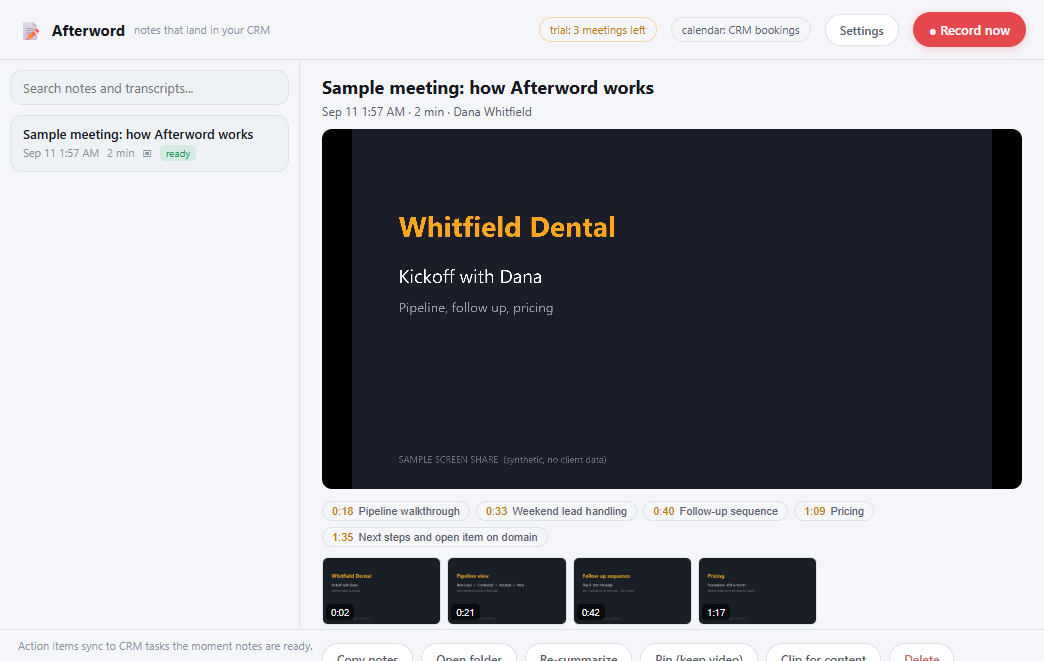
Afterword is the meeting notetaker that writes into your GoHighLevel. It records both sides of the call and your screen, writes the notes, and files the action items as tasks on the contact you were talking to. Before you stand up from the desk.
Every notetaker gives you a transcript. Then you do the work.
Granola, Fathom, Fireflies: they record and they summarize. Then they hand you a document and a to-do list you still have to type into the CRM yourself. That is the part that does not get done at 4:45 on a Friday.
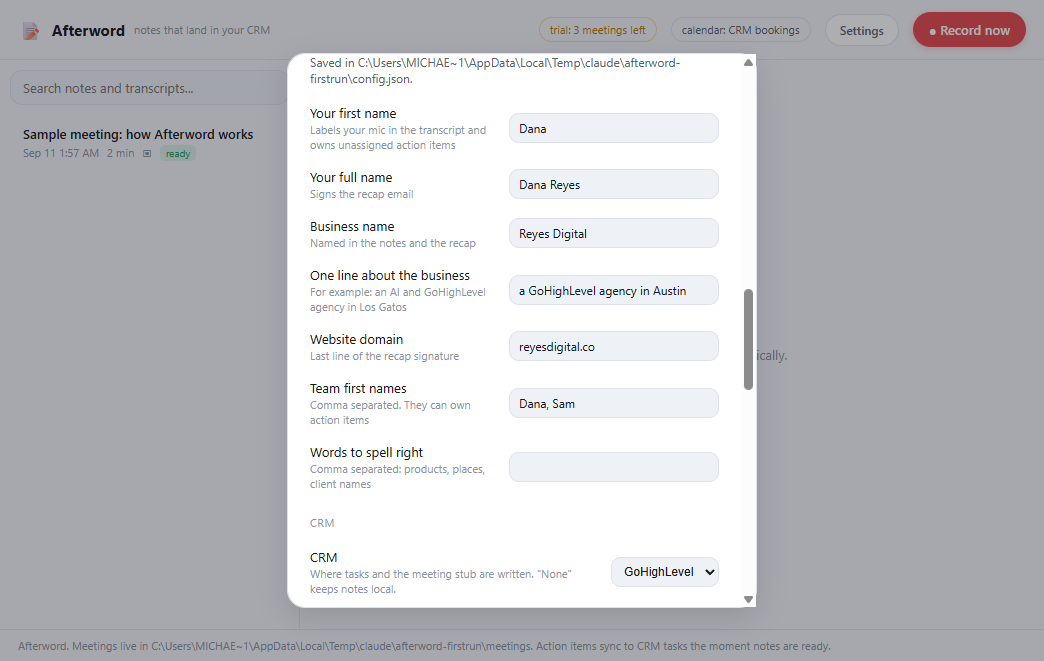
I built Afterword inside my own agency, which runs on GoHighLevel. I take calls all day and I needed the CRM to be right without me typing a thing after each one.
Four things nothing else in the category does.
Writes into GoHighLevel
- Knows who the meeting is with from your GHL calendar or the attendee email.
- Action items become tasks on that contact, with due dates, the moment notes are ready.
- A bare "meeting logged" note on the timeline. Never the transcript, never the summary.
The prep card
- Five minutes before a booked meeting: who it is, their open tasks, what the last meeting left unfinished.
- One click to record when it starts. One click into the contact.
Screen replay with chapters
- Records the screen you shared, at 10 frames a second, about 75 MB an hour.
- The notes' headings become chapters you can scrub to.
- Cut a clip from any replay for a demo or a testimonial.
Your keys, your machine
- Your side of the call is transcribed locally, free, and never leaves the computer.
- Notes are written with your own Anthropic key. Speaker separation with your own Deepgram key, optional.
- No bot joins the call, and nothing gets uploaded to me. I never see your recordings.
Fifteen minutes, once.
Install and paste three things
Your GoHighLevel private integration token and location id, and an Anthropic API key. Settings has a Test button for each.
Take a call
Afterword notices the meeting from your calendar or when Zoom takes the microphone, and asks to record. Say yes.
Check the contact
Notes in the library, tasks on the contact, the replay with chapters. The first three meetings are free. Then enter your key.
Be honest about which one you are.
- You run your business on GoHighLevel and your calls should end up in it.
- You take calls on Windows, on Zoom, Meet, Teams, or the phone through the computer.
- You would rather pay once and own the thing than rent it forever.
- You are fine pasting an API key. Two minutes, and Settings walks you through it.
- You are on a Mac. Not yet.
- You want a bot that joins the meeting for everyone to see.
- You do not use GoHighLevel. It still records and writes notes, but the point of it is the CRM.
You bring your own API keys, so you pay Anthropic and Deepgram directly at their prices, which comes to about five cents an hour of meetings. There is no plan to run out of.
Granola is $14 a month for a transcript. Over two years that is $336 and you still typed the tasks yourself.
One client follow-up that does not fall through the cracks pays for this.
Run it on real calls for two weeks. If it has not put a single task on the right contact by then, reply to your receipt and I refund you. Keep the notes.
Before you ask.
Does it upload my calls anywhere?
No. Your microphone is transcribed on your computer. The other side of the call goes to Deepgram only if you add a Deepgram key, and the notes are written by Anthropic with your key. I never see a recording, a transcript, or a note.
What do the API keys cost me?
Anthropic bills about four cents per hour of meeting for the notes. Deepgram is 46 cents an hour and only runs if you want remote speakers told apart by name. Without it, everything still works on the free local transcription.
Which calls does it catch?
Anything booked on a GoHighLevel calendar, and anything where an app takes the microphone for more than twenty seconds: Zoom, Teams, Meet in a browser, a dialer. You can also press Ctrl+Shift+M anywhere to start recording.
Is it legal to record?
Same rules as always: tell people you are recording. California is two-party consent. There is a start chime on by default so you always know it is running.
Windows says the installer is unrecognized.
The installer is new and not yet signed with a paid certificate, so SmartScreen shows a warning the first time. Click More info, then Run anyway. It installs for your user only, with no admin prompt.
What if I get a new computer?
One key works on three computers. Deactivate in Settings on the old one, or just activate the new one; if you are out of slots, reply to your receipt and it gets sorted.