Your call is over. The CRM is already filled in.
Oatmeal is the meeting notetaker that writes into your GoHighLevel. It records both sides of the call and your screen, writes the notes, and files the action items as tasks on the contact you were talking to. Before you stand up from the desk.
Free download. Free 30-day evaluation with every feature. After that, Oatmeal requires a one-time license. One payment, no subscription.
For Windows 10 and 11. Bring your own Anthropic API key for AI notes; provider usage is billed separately. Inspect a 75-second test and the tasks it created.
Your next step belongs on the client contact.
A useful summary still needs to become follow-up. Oatmeal turns meeting action items into tasks in GoHighLevel and keeps your recordings and notes as files on your computer. If that is where your work lives, this is the handoff it is built to handle.
I built Oatmeal inside my own agency, which runs on GoHighLevel. I take calls all day and I needed the CRM to be right without me typing a thing after each one.
Four things it does that a transcript does not.
Writes into GoHighLevel
- Knows who the meeting is with from your GHL calendar or the attendee email.
- Action items become tasks on that contact, with due dates, the moment notes are ready.
- A bare "meeting logged" note on the timeline. Never the transcript, never the summary.
The prep card
- Five minutes before a booked meeting: who it is, their open tasks, what the last meeting left unfinished.
- One click to record when it starts. One click into the contact.
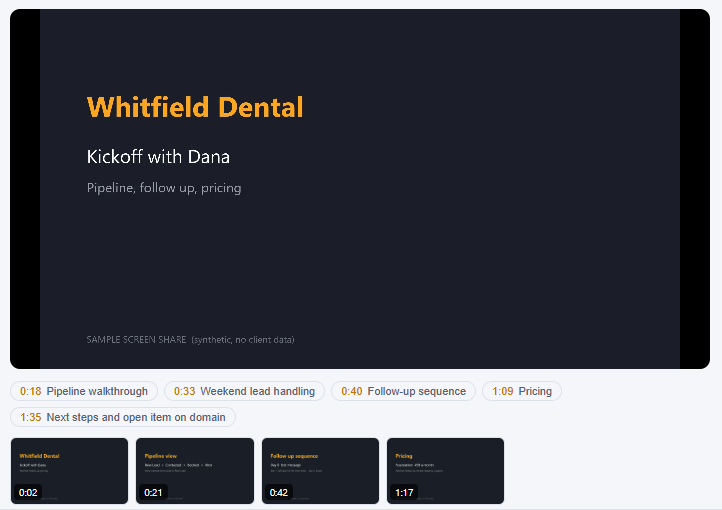
Screen replay with chapters
- Records the screen you shared at 10 frames a second. A 40 minute call on a mostly still screen is about 75 MB.
- The headings in the notes become chapters you can scrub to.
- Cut a clip from any replay for a demo or a testimonial.
Your keys, your computer
- Local transcription runs on your computer with no per-minute provider charge. Cloud fallback has separate usage costs.
- Notes are written with your own Anthropic key. Telling the other speakers apart uses your own Deepgram key, and that one is optional.
- No bot joins the call. On Point Tech never receives your recordings, your transcripts or your notes. What does leave your computer is listed below.
What leaves your computer.
Writing notes with AI means sending the AI something to read. This is everything that goes out, and where it goes.
- To Anthropic, on your key
- The meeting transcript, up to 18 screenshots of your screen if screen capture is on, and what your CRM already says about that contact. The notes are written from those.
- To Deepgram, only if you add that key
- Audio for cloud transcription and remote speaker separation. Your microphone audio can also go there if local transcription is unavailable or the selected language needs the cloud path. First-run engine downloads normally hold processing until ready. With no Deepgram key, nothing goes to Deepgram.
- To your GoHighLevel, if you connect it
- The tasks, and a bare "meeting logged" note on the contact.
- To the licensing service, only if you activate a key
- The license key and an identifier for that computer, so one key can be held to three computers.
- Everything else stays on your computer
- The audio, the screen video, the transcript files, the notes and the library are files on your disk. On Point Tech does not receive any of them. Oatmeal also checks for updates and downloads its engine once, and neither of those carries anything about your meetings.
Choose the workflow you need after the call.
Compare Granola and Oatmeal, Otter and Oatmeal, or Fireflies and Oatmeal. The meeting notetaker guide also covers Fathom, tl;dv, Read AI, Krisp and Notion.
See how meeting notes become GoHighLevel tasks and what stays local and what goes to AI providers. Each guide includes setup limits and reasons another app may fit better.
Try the free Granola CSV-to-Markdown converter to keep a readable archive, or compare license and API costs using your own figures. Both tools work in your browser without uploading your entries.
Fifteen minutes, once.
-
Install and paste three things
Your GoHighLevel private integration token and location id, and an Anthropic API key. Settings has a Test button for each.
-
Let the engine download
The first time it runs, Oatmeal downloads its transcription engine, about 750 MB in total. It happens once and the main window shows the progress.
-
Take a call, then check the contact
Oatmeal notices the meeting from your calendar or when Zoom takes the microphone, and asks to record. Say yes. Afterward the notes are in the library and the tasks are on the contact.
Want the full walkthrough, including the exact GoHighLevel permissions and what happens after 30 days? Read the getting started guide.
Be honest about which one you are.
This is for you if
- You run your business on GoHighLevel and your calls should end up in it.
- You take calls on Windows 10 or 11, on Zoom, Meet, Teams, or the phone through the computer.
- You would rather pay once for a tool than rent it every month.
- You are fine pasting an API key. Two minutes, and Settings walks you through it.
This is not for you if
- You are on a Mac. Not yet.
- You want a bot that joins the meeting for everyone to see.
- You do not use GoHighLevel. It still records and writes notes, but the point of it is the CRM.
- You need a notetaker that sends nothing to an AI company. Anthropic's model writes the notes, so the transcript goes to Anthropic.
The honest costs.
- Your own Anthropic key.AI notes have separate usage charges. The total depends on the model, transcript length, screenshots and retries. Use your provider's usage report to estimate your own monthly cost.
- Deepgram is optional.Cloud transcription and speaker separation have separate usage charges. With a Deepgram key, microphone audio can also use the cloud path when local transcription is unavailable or unsuitable for the selected language. Without that key, supported local transcription has no provider fee; remote speakers are grouped as "Them".
- One download of about 750 MB.That is the transcription engine. Oatmeal fetches it the first time it runs and never again.
- Windows 10 and 11 only.There is no Mac version yet.
- Windows will warn you about the installer.It is not code signed yet, so SmartScreen shows a blue "Windows protected your PC" box the first time. Click More info, then Run anyway. It installs for your user only, with no admin prompt.
- Recording laws are on you.Tell people you are recording, every time. California needs everyone on the call to agree. When a recording starts, Oatmeal shows you the line to say and a button to paste it in the meeting chat.
Get Oatmeal for Windows.
Tell me where to send the setup guide and the download opens right here.
Your download is ready.
Open the setup guide for the engine download, API keys and GoHighLevel connection.
Windows will warn you the first time, because the installer is not code signed yet. Click More info, then Run anyway.
One license. No subscription.
Oatmeal is free to download and free to evaluate for 30 days, with every feature. It is not free software. After the 30 days, the official build requires a license, and it reminds you at most once a day.
A license is one payment, with no subscription. It covers one person on up to three computers.
Every option is the same license. The higher prices are for people who want to put more behind the work, and they unlock nothing extra. Your key comes by email a few minutes after you pay. Paste it into Settings and the reminder is gone for good.
What stays yours
Your recordings, transcripts and notes are files on your computer. On Point Tech never holds them. They are always yours.
Before you ask.
Does it upload my calls anywhere?
Recordings are saved on your computer. The transcript goes to Anthropic on your key so the notes can be written, along with up to 18 screenshots if screen capture is on. With a Deepgram key, audio can also go to Deepgram for cloud transcription, including microphone audio when the local path is unavailable or unsuitable for the language. On Point Tech never receives a recording, a transcript, or a note. The full list is here.
What happens after the 30 days?
Oatmeal shows a reminder that a license is required. It appears at most once a day and never during a recording. A license is a one-time payment, with no subscription, and it covers three computers.
What do the API keys cost me?
Anthropic bills for the model input and output used to write notes. Deepgram bills for cloud transcription when you enable it. The amount depends on your settings and usage, so there is no fixed cost per meeting hour. Local transcription has no per-minute provider charge. Compare costs using your own figures.
Which calls does it catch?
Anything booked on a GoHighLevel calendar, and anything where an app takes the microphone for more than twenty seconds: Zoom, Teams, Meet in a browser, a dialer. You can also press the record shortcut anywhere to start recording. It is Ctrl+Alt+Shift+R unless you change it in Settings.
Is it legal to record?
No bot joins, and you still tell people you are recording. California needs everyone on the call to agree. The moment a recording starts, Oatmeal shows you the line to say and a button to paste it in the meeting chat.
Windows says the installer is unrecognized.
The installer is new and not yet signed with a paid certificate, so SmartScreen shows a warning the first time. Click More info, then Run anyway. It installs for your user only, with no admin prompt.
What if I get a new computer?
One license works on three computers. Deactivate in Settings on the old one, or just activate the new one. If you are out of slots, send us a note and it gets sorted.