Key takeaways
- On August 19 we found our website and text assistant had spent three weeks quoting a rate card we retired on July 21.
- Its instructions already said never to quote prices and to route those questions to a call. Editing the instructions changed nothing, because the assistant answers pricing from its knowledge base, not from its instructions.
- We corrected all 16 priced answers in the knowledge base and read every one back, clean. It still quoted the old prices.
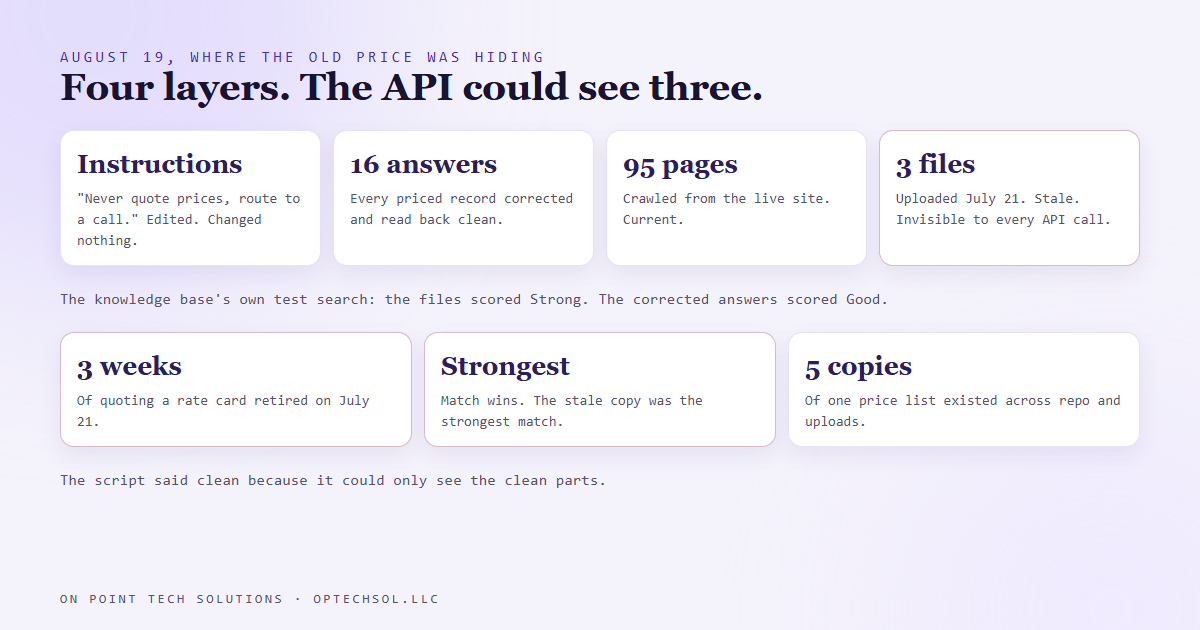
- The knowledge base also held three uploaded documents, stale copies of our own pricing pages, that no API can list or read. The assistant's own test search ranked them above the corrected answers.
- The fix: delete the three files, keep that section empty on purpose, and after every price change run the test search with a pricing question and check where the answer came from.
Any business running Go High Level in the Bay Area with an AI assistant on the website or the text line will meet this one eventually. Prices change. The assistant keeps quoting the old ones, from somewhere you cannot see. Ours did it for three weeks, and the fix was nowhere near where I spent the first hour looking.
Three weeks of wrong numbers
On July 21 we retired a rate card. New offers, new numbers, the sales sheet rewritten. On August 19, getting ready for a live phone demo, we asked the assistant on our own site a pricing question the way a prospect would. It answered with the old price. We asked three more ways. Old, old, old.
Three weeks. Every prospect who had asked about price in that window had been quoted something we no longer sold, at a number we no longer charged. A live demo was coming up, and the thing we were about to show people was confidently wrong.
The first fix changed nothing
The assistant's instructions are the first place anyone looks. Ours already said it plainly: never invent pricing, route pricing questions to a call. It had said that for a while. So the assistant was ignoring its instructions, or so it looked.
It was not ignoring anything. The instructions govern how the assistant talks. What it knows comes from a separate object, the knowledge base: a set of question and answer records plus pages crawled from our site. Pricing questions were being answered from there, and the instructions never got a vote. Editing the instructions was editing the wrong thing.
The second fix also changed nothing
So we went to the knowledge base. Of its question and answer records, 16 carried a dollar figure. We corrected all 16 through the API and read each one back. Clean. New prices in every record.
Then we asked the assistant again. Old price.
The copy I had forgotten I made
The knowledge base has a third kind of source besides answers and crawled pages: uploaded files. Back on July 21, the same day the rate card changed, three documents had been uploaded into it, copies of our business overview, our FAQ and our pricing page as they stood that morning. Then the originals were updated and the uploads were not.
No API lists those files. No API reads them. Every check we could run from a script said the knowledge base was clean, because the script could only see the parts of it that were. But the knowledge base has a test search built into its own screen, and when we typed a pricing question into it, the top two results came from the uploaded files, graded Strong, while the corrected answers sat underneath them graded Good.
The assistant was doing exactly what it was built to do: take the strongest match. The strongest match was a stale copy of a page we had corrected everywhere else.
The fix, and the rule that keeps it fixed
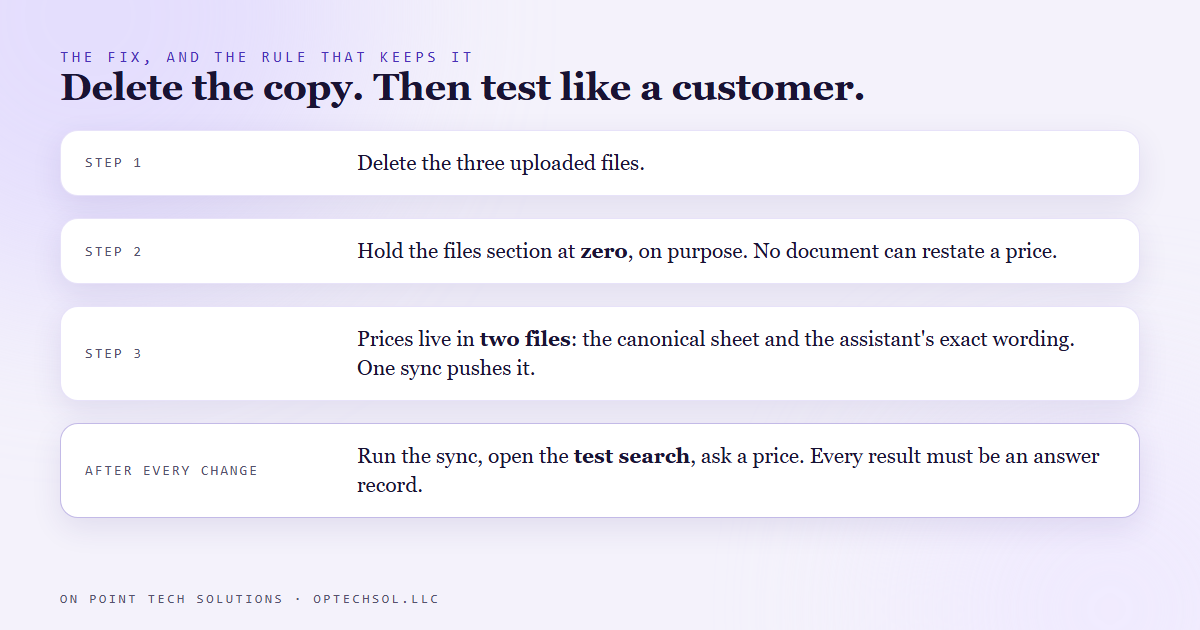
- Delete the three files.
- Keep the files section at zero, on purpose. No document goes in there that could restate a price, because a document cannot be corrected by the sync that corrects everything else.
- Prices now live in exactly two files in our repo: the canonical sheet, and the file that holds the exact wording the assistant uses. A sync script pushes the second one into the knowledge base. Everything else links to those two instead of restating them. Before the fix there were five copies of one price list.
- After every price change: run the sync, then open the test search and ask a pricing question. Every result should be an answer record. Any result from a file means something stale is still in there.
What this means for Bay Area businesses running Go High Level
You have copies too, and most of them are not in software. The price list taped up by the register from two increases ago. The PDF menu on the website. The saved reply a staff member pastes into messages, written the year they started. The brochure in the truck. Each one was accurate the day it was made, and each one is answering customers right now.
The dangerous copy is the one that outranks the real thing. A customer trusts the printed sheet over the person quoting a different number. Our assistant trusted the uploaded file over the corrected record.
Three things worth doing this week:
- Write down every place a price appears that a customer can reach: the site, the assistant, print, saved replies, directory listings. Be honest about the ones you forgot.
- Pick one source of truth. Every other place either points at it or gets deleted.
- After the next change, test from the customer's side. Ask the assistant. Read the menu on your phone. Do not check the file you edited; check the answer a customer actually gets.
A Go High Level build in the Bay Area is only as honest as its oldest surviving copy. Find yours before a prospect does.
Want to build this yourself?
Join the On Point Tech Academy at optechsol.llc/academy. It's free, and we build live every Tuesday and Thursday.
The On Point Tech Academy costs nothing and never asks for a card. We build live every Tuesday and Thursday, 12:30 to 1:30 PT.
Join the Academy free ← Back to all Field Notes