Key takeaways
- On July 28 we published a follow up for people who miss a booked call. Within a minute of going live it texted "sorry you weren't able to make our call" to six contacts at once, for appointments of any age.
- Later that day one of those six was being rescheduled by hand. The rebooking set the follow up off again, so he was told to rebook 17 seconds before he was told he was booked. He replied STOP an hour later.
- He had no email on file. That one word means the CRM can never reach him again.
- The obvious fix, the setting that stops anyone entering a workflow twice, does not apply here. The platform's own help text says appointment triggers ignore it.
- The fix has to be structural: a short wait after the trigger, a check that exits anyone who already has an upcoming appointment, and a look at who would qualify before publishing anything whose trigger can look backwards.
If you run Go High Level in San Jose, you have probably built a no show follow up. It is one of the first automations anyone builds, and it is a good one. Somebody books a call, misses it, and a friendly text goes out: sorry we missed you, here is a link to grab another time. Ours did exactly that. It was right one message at a time, wrong in volume and timing, and it cost us a lead we had already won.
What we built
On the morning of July 28 we built and published a workflow for no shows. The trigger was an appointment changing to no show status. The action was one text: sorry you weren't able to make our call, with a link to rebook. It went live a little after 8am.
What happened in the first minute
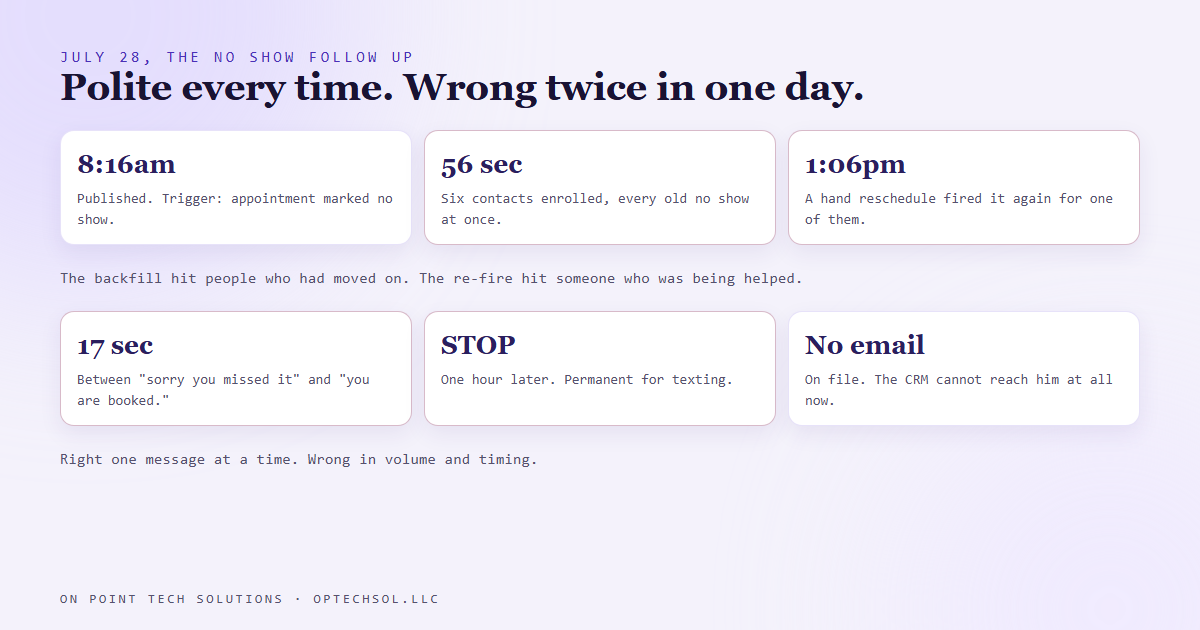
Within 56 seconds the workflow had enrolled six contacts. All six got the apology at the same moment. Not one of them had missed a call that morning.
Publishing had swept up every contact who had ever been marked a no show, however old the appointment. If the status matched, it fired, so six people who had quietly moved on got an apology about a call some of them could barely remember booking.
Six texts in under a minute looks wonderful on a dashboard. From the other side it looks like a business that has lost track of who you are.
What happened that afternoon
Later the same day, one of the six asked for a new time. We moved his appointment in the calendar by hand. Moving it changed the appointment's status, and the change set the workflow off again for him. The no show text went out. Seventeen seconds later, the rebooking confirmation went out. He was told to rebook before he was told he was booked.
An hour later he replied with one word: STOP.
That word is permanent. The platform marks his number as do not disturb for texting and nothing on our side can undo it. He had no email on file. So a lead who had shown interest twice, once by booking and once by asking to rebook, became someone the CRM cannot reach at all. The offer had nothing to do with it. A polite automation fired twice in the wrong minute.
The obvious fix does not work here
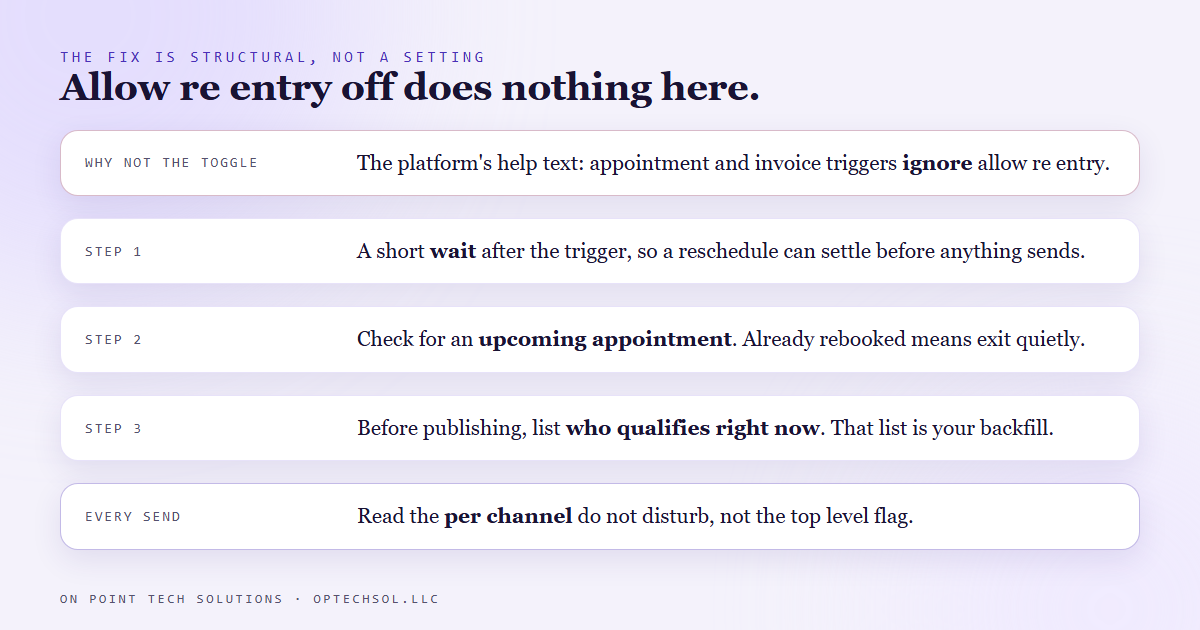
Every workflow has a setting for this: allow re entry. Turn it off and a contact who has been through once cannot go through again. That was my first move, and it is a dead end. The platform's own help text under that setting says that if the workflow has appointment or invoice based triggers, the contact will be allowed back in even with the setting off. The toggle is right there. For this trigger it does nothing.
So the fix has to live in the shape of the workflow, not in its settings.
- A short wait right after the trigger, so a status change that is part of a reschedule has time to settle before anything sends.
- Then a check: does this contact already have an upcoming appointment? If yes, exit quietly. Someone who is already rebooked does not need to be asked to rebook.
- Before publishing anything whose trigger can match old records, pull the list of who qualifies right now. If anyone on it should not get the message, the publish button is not ready.
One more thing came out of the wreckage. The contact record carries a top level do not disturb flag, and it can read as off while the texting channel underneath it is permanently stopped by the customer's own reply. Anything we send now reads the per channel setting first, because checking the top level flag alone would send a text the customer has legally told us not to send.
Why this matters for San Jose businesses on Go High Level
Every reminder, every win back campaign, every "we miss you" sequence has the same shape as this one. It watches for a condition and sends when it sees it. The question almost nobody asks before switching one on: who does this hit the moment I turn it on?
Backfill is the quiet one. A new workflow has no sense of time, so if the trigger can match old records it matches all of them at once, and your new automation introduces itself with a dozen apologies to people who had forgotten you.
Re firing is the other. Any real business has people touching records all day: rescheduling, fixing a status, merging a duplicate. Each touch can look exactly like the trigger.
Three things worth doing this week:
- Before you publish a reminder or a win back, list who qualifies right now. If that list is longer than you expected, that is your backfill, and it goes out the second you hit publish.
- Put a wait and a check in front of every send. Is this person already handled? Then say nothing.
- Treat every STOP as a permanent loss and count them. Each one is a lead you had already won, lost to timing instead of to a competitor.
A good Go High Level setup in San Jose is not the one with the most automations running. It is the one where every message would make sense to the person receiving it, in the minute they receive it.
Want to build this yourself?
Join the On Point Tech Academy at optechsol.llc/academy. It's free, and we build live every Tuesday and Thursday.
The On Point Tech Academy costs nothing and never asks for a card. We build live every Tuesday and Thursday, 12:30 to 1:30 PT.
Join the Academy free ← Back to all Field Notes