Key takeaways
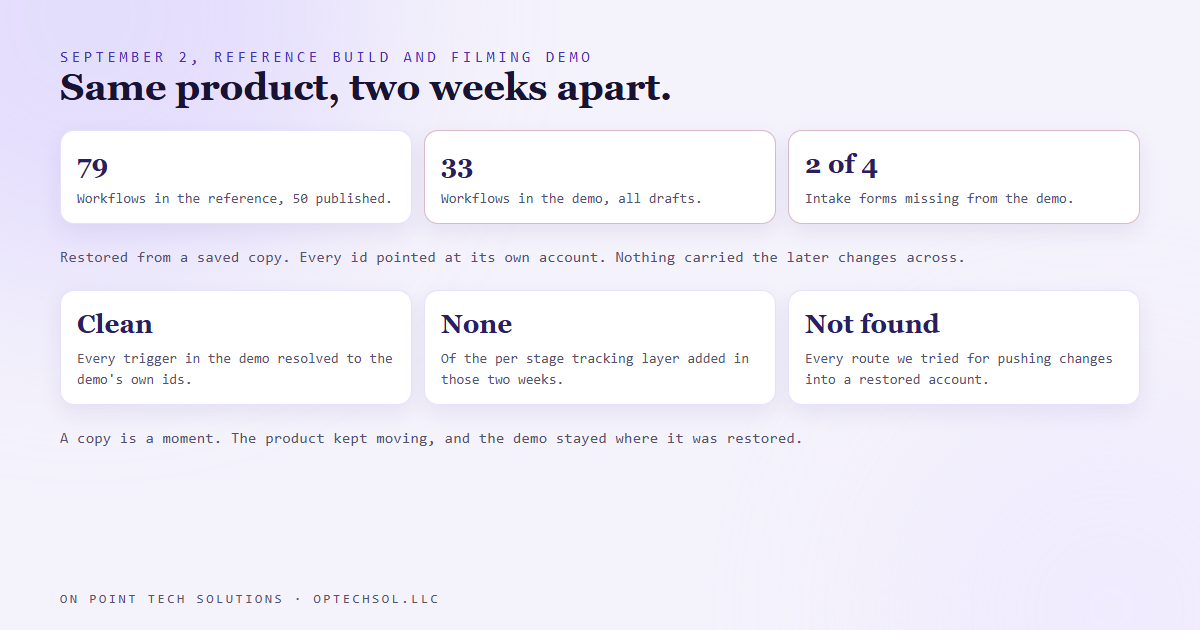
- On September 2 we compared the reference build of a CRM template we sell with the separate demo account we film and present from. The reference held 79 workflows, 50 of them published. The demo held 33, all drafts, and was missing two of its four intake forms.
- Anything filmed from the demo would have shown a product two weeks older than the one being sold. Nothing told us.
- The demo had been restored from a saved copy, and the restore did its job well: every id inside it pointed at its own account. What does not exist is any way to push later changes from the original into an account that already restored it.
- We caught the demo up by re-running every builder against it, matched by name, so they updated what was there instead of making duplicates. Both now hold 79 workflows.
- The question for any business with a sample, a template or a "standard" version: when the original changes, what carries the change to the copies?
Any GHL consultant in the Bay Area who sells a template has two of it. There is the real one, the build you keep improving. And there is the one you show people. On September 2 I found out how far apart mine had drifted, and the honest answer was that nothing in the system was ever going to tell me.
Why there are two accounts
One of the products we sell is a CRM template for a specific industry: pipelines, forms, follow up sequences, compliance watchers, the whole thing, wired and ready to restore into a customer's own account.
The reference build is the product. It ships neutral on purpose. The business name, the sender details, all of it blank, because a placeholder like "business name here" landing in a live customer email is worse than nothing. That also makes it useless to film. A demo with no name and no people in it shows nobody anything.
So there is a second account, restored from a saved copy of the reference, fully branded as a demo, with a seeded book of made up clients and deals. That is the one that goes on screen. We wrote about why it exists a few weeks back. This post is about what happens to it afterwards.
What the comparison found
We have a read only script that proves a template account actually works, and on September 2 we pointed it at both accounts and compared the shapes.
The reference held 79 workflows, 50 of them published, including a whole per stage tracking layer we had added over the previous two weeks. The demo held 33. All of them drafts. It was missing two of its four intake forms. It had none of the tracking layer at all.
The demo was a faithful copy of the product as it stood the day it was restored. The product had moved on, and the demo had not moved with it. Anyone watching a video filmed from it would have been looking at something two weeks older than what we were selling.
The restore was not the problem
My first guess was that the restore had gone wrong. It had not. We checked every trigger in the demo's 33 workflows, and every pipeline, stage, field and form id resolved to the demo's own account. The saved copy had been rebuilt cleanly, with nothing pointing back at the original.
The copy was fine. The problem is that a copy only ever shows the day it was made. The platform can refresh the saved copy so the next customer gets the newest version. What it cannot do, and we tested every route we could think of, is push later changes into an account that already restored an older one. Every candidate came back not found.
So there is no button for this. The demo was always going to age, and nothing was ever going to say so.
How it was caught up
The template is built by scripts. Each builder knows which workflow it owns through a small state file that maps its name to a workflow id. Point those builders at the demo with no state and they would have created a second copy of all 33 workflows that were already there.
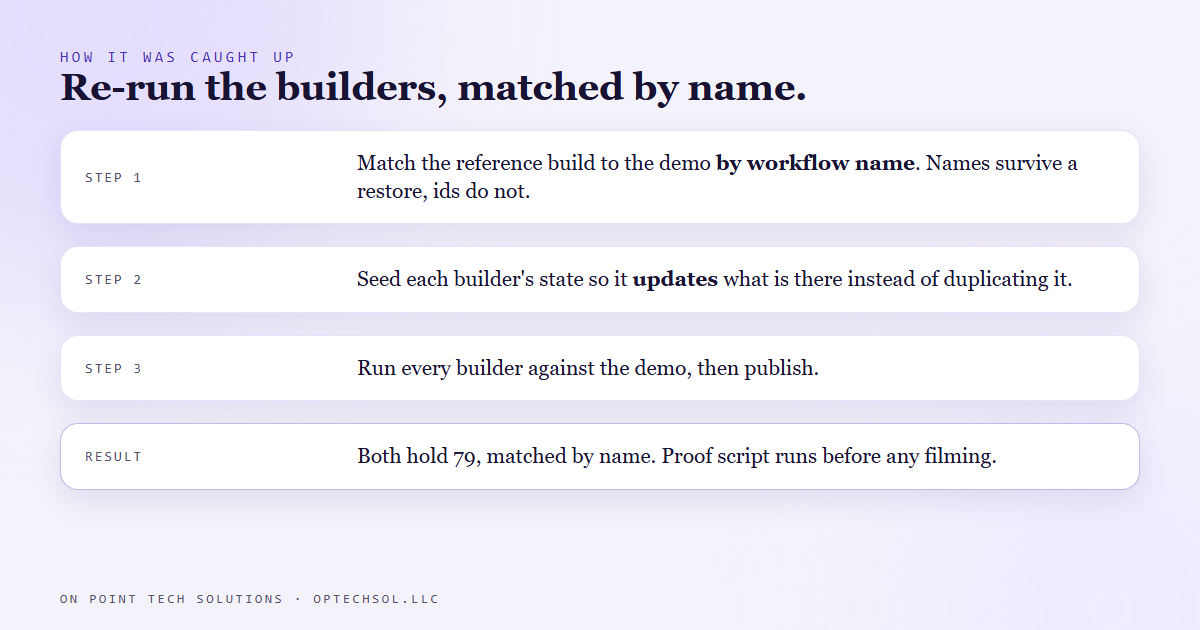
So the first step was a script that matched the reference build to the demo by workflow name. Names are the one thing that survives a restore; ids do not. It wrote a state file for the demo where every existing workflow was already claimed, and reported exactly what would be updated and what would be created.
Then every builder ran against the demo, updating what was there and creating only what was missing. Then the publish step. Both accounts now hold 79 workflows, matched by name, and the proof script runs against both before anything gets filmed.
What this means for Bay Area businesses hiring a GHL consultant
You have copies too. A sample proposal you send every prospect. A "standard" job template your crew works from. A training account you onboard new hires in. A demo your salesperson shows. Each of those started as an exact copy of the real thing, and each one started aging the day it was made.
Nobody notices, because a stale copy does not break. It just quietly shows people a version of your business that no longer exists.
Three things worth doing this week:
- Name your copies. Write down every sample, template, demo and training version you have, and next to each one, where the original lives.
- For each copy, answer one question: when the original changes, what carries the change here? If the answer is "someone remembers," it is already behind.
- Pick the copy that customers see most. Put it next to the original and compare them. You are measuring how far it has moved, and it has moved.
A good GHL consultant in the Bay Area will show you the product you are buying. Ask when the demo was last compared to it.
Want to build this yourself?
Join the On Point Tech Academy at optechsol.llc/academy. It's free, and we build live every Tuesday and Thursday.
The On Point Tech Academy costs nothing and never asks for a card. We build live every Tuesday and Thursday, 12:30 to 1:30 PT.
Join the Academy free ← Back to all Field Notes