The Local AI Guy: one story and one new thing to learn, every day, from Los Gatos.
A few weeks back I had a one-to-one with a builder from a BNI chapter here in the Bay Area. We got onto software and he got fired up. He has always wanted business tools a regular person could adjust without calling a developer every time something needs to change.
His point was simple. Every business runs a little differently, and everybody looks at their numbers a little differently. So why should the software make everyone wear the same size shoe?
I was nodding the whole time, because I feel the same way. I've had some version of this conversation on half a dozen calls this fall, and it keeps landing in the same place. Owners don't want more apps. They want something that's theirs.
A rental versus a house built from your floor plan
He's a builder, so I put it in his terms.
A lot of business software works like a rental. It's a nice unit, but somebody else drew the floor plan and somebody else holds the keys. If you want to move a wall, you put in a request and wait. So you learn to live around it, and your process bends to fit the rooms.
The other way is the house built from your own floor plan. You decide where the kitchen goes because you know how you cook. The keys are in your pocket. And if you ever want to sell, the house is worth something, because it's yours.
That's how I build for clients, and it's what I told him. It's all about how you run it. The system gets built around your process, it's in your name, and if you ever want to take it somewhere else, you can. The tool underneath can still be a monthly plan. The way you set it up (the steps, the forms, the follow-up) is yours.
There's a catch people miss. A house nobody knows how to live in isn't worth much. The system only really counts as yours once it's running and your team knows how to use it, well enough that someone else could pick it up and do it the same way.
How to own the system you run on
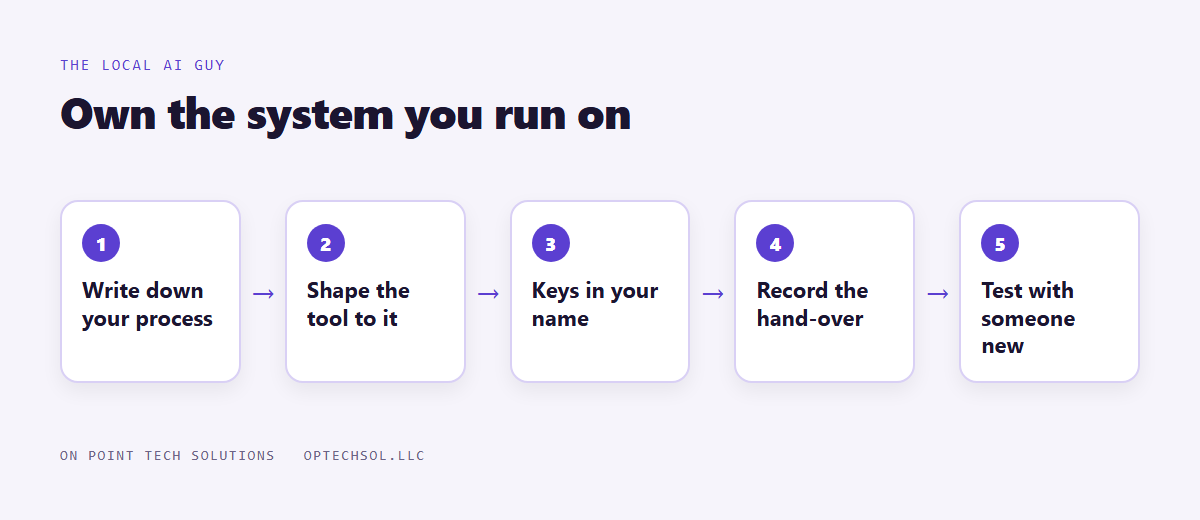
This is the order I'd do it in. I'll use GoHighLevel (GHL), since that's what we build on, but the idea works with almost any tool.
- Draw your floor plan first. Before you touch any software, write down how a job moves through your business today. First call, quote, booked, done, paid. Plain words, one page. This page is the part that's truly yours, so don't skip it. My team and I built our own system the same way, off our own process.
- Build the rooms to match. Now shape the tool to that page, not the other way around. In GHL, the pipeline (the board of stages a lead moves across) gets your stage names in your order. Your forms ask the questions you'd ask on the phone. If a step on your page has no spot in the tool, make one.
- Keep the keys in your pocket. The account, the domain and the main login all go in your business's name, with you as the admin. Anyone helping you, me included, gets a seat at the table. They don't get the deed. That way, if you ever want to move it, you can.
- Do the walk-through before move-in. When the build is done, record a short screen video of yourself clicking through each step. Then write a one-page SOP (a standard operating procedure, which is just a plain checklist of how we do this). The recording and the page together are your hand-over.
- Test it with someone new. Give the SOP to someone on your team who didn't build it. Can they take a lead from first call to booked without calling you? If yes, it's repeatable. If not, fix the page, not the person.
- Move your own furniture. Once it's running, the small changes are yours to make. Rename a stage, add a question to a form, change the wording on a text. You shouldn't need to file a ticket to repaint the kitchen.
AI is what makes this easier every month. The better these tools get, the more you can go into your own setup and adjust it yourself. You just need a good template and a clear picture of how you work. That's one more reason the floor plan matters so much. It's what you hand the AI, too.
Less to learn when it's built your way
Any new tool comes with the same cost: somebody has to learn how to use it. Your office manager, your crew lead, or you at 10pm. When software is built for everybody, everybody has to learn its way of thinking.
When the system is built off your process, there's a lot less to learn. The steps on the screen are the steps your team already does, so training is mostly showing them where their work lives now. That gives you an evening back instead of one more login to babysit.
Back to the builder
Picture what that looks like for him. His jobs move across a board with his stage names on it. His forms ask his questions. The logins are in his company's name. And somewhere there's a short video and a one-page checklist a new hire could watch on day one and follow without him standing over their shoulder.
That's the house he'd want to build anyway. Anyone can buy the same tools. What changes is whose floor plan they follow and who holds the keys.
Why this matters for Bay Area small businesses
The owners I meet around the South Bay and the rest of the Bay Area are great at their trade and short on time. They don't need another app to learn. They need a business system that fits how they already work, that they own outright, and that their team can run without them. That's what we set up on GHL every week, and it's what we run our own business on.
Rent the tools if you want. Just make sure the house is yours.
Want to learn this with other owners?
I teach this stuff for free. Join the On Point Tech Academy at optechsol.llc/academy and you get the walk-throughs, the templates and a room full of owners figuring it out with you. And if you'd rather we just set it up for you, that's what we do every day.
See you tomorrow. Michael, The Local AI Guy.
The On Point Tech Academy costs nothing and never asks for a card. We build live every Thursday, 12:30 to 1:30 PT, with whatever AI you use.
Join the Academy free ← Back to all Field Notes