Key takeaways
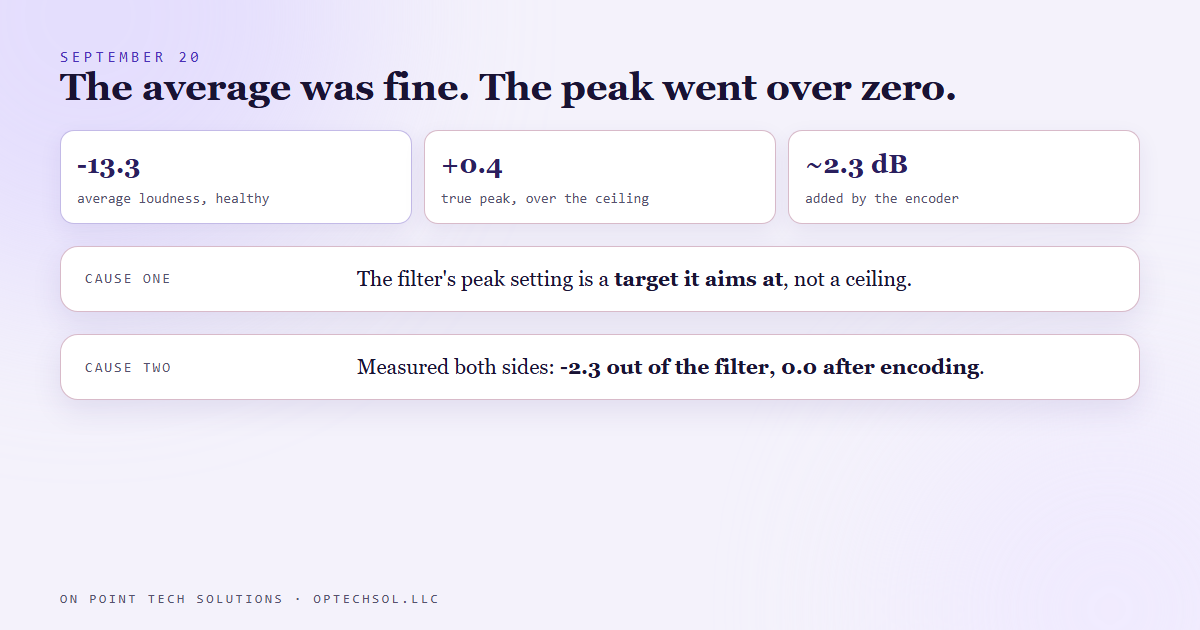
- On September 20 one of our finished social reels measured a healthy average loudness, -13.3 on the standard scale, and a true peak of +0.4. Anything above zero is clipping.
- Two causes stacked. The loudness filter treats its peak setting as a target it aims at, not a ceiling it enforces. And the audio encoder added about 2.3 dB of peak on top of whatever the filter handed it.
- A limiter at the normal sample rate did not catch it, because peak meters look between the samples and that limiter only looks at the samples.
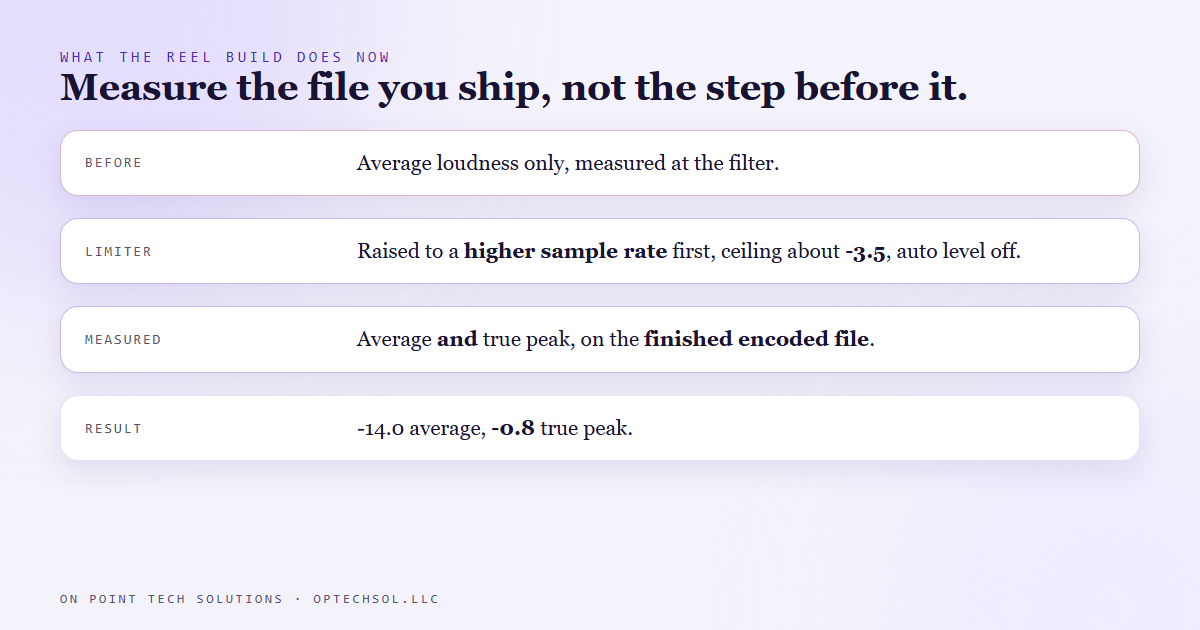
- The fix limits at a much higher sample rate, with a ceiling well under the target to leave room for the encoder. The finished file came in at -14.0 loudness and -0.8 true peak.
- No reel before that day ever had its peak measured, only its average. The old logs prove nothing about clipping either way.
Ever approved a flyer proof that looked perfect on your screen and came back from the printer with the colors off? The proof passed and the print you paid for did not. We work as a GHL consultant in the Bay Area, and we make short videos every day for our own socials. On September 20 we found out we had been checking the proof, not the print.
What the reel builder checks
Every day a build puts together our short vertical reels: real footage, captions, music under the voice. Audio is the part people notice last and forgive least. Too quiet and they scroll past. Too loud and it crackles on a phone speaker.
So the build had a loudness step. It runs the mix through a loudness filter aimed at the level social platforms expect, then measures the average and writes it in the run log. Every reel had a number like -13.4 next to it, and every number looked right.
September 20
That day we measured a finished reel two ways instead of one. The average loudness was -13.3, which is healthy. The true peak, the loudest instant in the file, was +0.4.
Digital audio has a hard ceiling at zero. Anything that tries to go above it gets flattened, and flattened audio is the crackle you hear on a cheap speaker. The file passed the check we had, and it clipped.
Two causes, stacked
The first was the loudness filter. We had given it a peak setting of -1.5, which reads like a limit. It is not. In the single pass mode we were using, the filter treats that number as something to aim for, not a line it will never cross.
The second was quieter. After the filter, the audio gets encoded into the format the video file carries. We measured the same audio on both sides of that step. Coming out of the filter, the peak was -2.3. After encoding, it was 0.0. The encoder alone added about 2.3 dB of peak, every time, on top of whatever it was handed.
So even a perfect filter would not have saved us. The step after it moved the number.
Why the obvious fix did not work
The natural move is a limiter: a step that squashes anything above a set level. We tried one at the normal sample rate. It did not fix it, for two reasons.
Peak meters built for this job look between the samples, at where the actual sound wave goes when it is played back. A limiter working at the normal rate only sees the samples themselves, so the peaks in between slip right past it. And that limiter, left on its defaults, turns the whole thing back up toward the ceiling afterwards, which undoes the point of setting one.
What the build does now
The fix has three parts. Before encoding, the audio gets raised to a much higher sample rate, so the limiter can see what happens between the original samples. The limiter's ceiling sits well under the target, at about -3.5, to leave room for the 2.3 the encoder is going to add. And the auto level setting is off.
The reel from September 20 came out at -14.0 average and -0.8 true peak, under zero with room to spare.
The bigger change is where we measure. Every reel is now measured as the finished file, the one that actually gets posted, and the run log records both numbers, average and true peak, taken from the file we ship instead of the filter's output.
The honest lesson
Every reel before September 20 has an average loudness in its log and no peak at all. Those logs can't tell you whether those reels were clean or clipped. We have not recorded a sweep of the old ones, so we cannot tell you how many crackled. What we can say is that the check we trusted was measuring the step before the problem.
What this means for Bay Area businesses posting their own content
Most owners will never open an audio meter, and that is fine. The same mistake shows up in plenty of other places. The proof looked right, the export looked right, the preview looked right, and the version people actually got was different.
- Check the thing your customer gets, not the step before it. Watch the posted video on your own phone, through the speaker, not the edit on your laptop.
- Call your own business line and listen to the greeting and the hold message the way a caller hears them.
- Send your follow-up email or text to yourself from the CRM and read it on a phone, not in the editor preview.
- When a tool gives you one number that says fine, ask what it does not measure.
A good GHL consultant in the Bay Area tests your setup as a customer would meet it, and you can do the same in an afternoon.
Want to build this yourself?
Join the On Point Tech Academy at optechsol.llc/academy. It's free, and we build live every Tuesday and Thursday.
The On Point Tech Academy costs nothing and never asks for a card. We build live every Tuesday and Thursday, 12:30 to 1:30 PT.
Join the Academy free ← Back to all Field Notes