The Local AI Guy: one story and one new thing to learn, every day, from Los Gatos.
A few weeks ago I had a one-to-one with a tradesman from a BNI chapter here in the Bay Area. Licensed, knows his stuff, the kind of guy you want in your house when something is wrong with it. At some point I asked him the question I ask everybody now. How are you using AI?
He was straight with me. Mostly as a search engine, he said. He bounces between a couple of the big chat apps, mostly on his phone.
And he's good at it. When he needs something out of his code book, he asks the AI and it points him to the right section faster than he can flip the pages. He knows how to find it himself. It's just quicker to ask, and he said it's been pretty accurate.
That's a real win. It saves him a few minutes here and there. But I told him what I tell everyone who uses AI this way. He's treating it like a reference book, and it can work like an apprentice.
A book versus an apprentice
A book answers when you ask. You open it, find the page, close it, and you still have to go do the work yourself.
An apprentice is different. You hand them a job. You show them how you like it done. The first one comes back a little off, you correct them, and a few jobs later they're doing it close to the way you would. Pretty soon they're taking things off your plate that you used to stay late for.
That's the shift with AI right now, and most people haven't made it yet. They open it in a browser tab and ask it questions all day. That's the book. The desktop app is where it starts acting like the apprentice, because the desktop version can actually do things for you instead of just telling you things.
The other half is how you talk to it. You stop asking it what to do. You tell it what to do, and you give it a couple of tools to do the job with.
How to give AI its first job
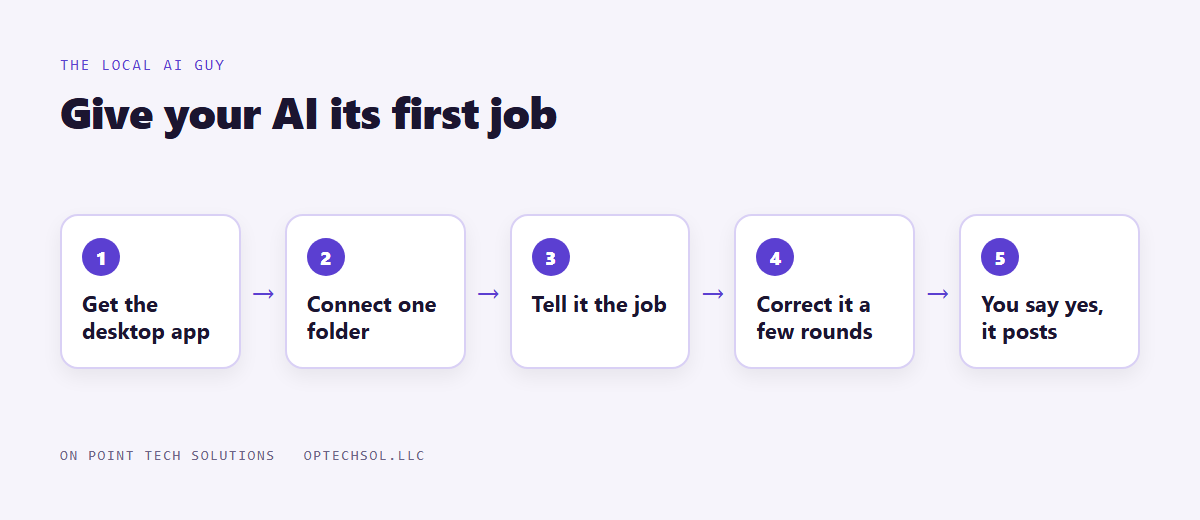
Here's the walk-through I gave him, using the example we talked about, which was social media. Every tradesman I know has a phone full of job photos and videos that never get posted. That pile is the perfect first job.
- Get the desktop app. Whatever AI you already use, download the desktop version instead of living in the browser tab. I use Claude. The desktop app is the one that can open your files and take actions on your computer, not just chat with you.
- Connect one or two tools. A connector is just permission for the AI to reach into another app or folder. Start small. The folder where your job photos and videos land is plenty for now. Your calendar and your social accounts can come later.
- Tell it, don't ask it. Skip the question about how to make a good post. Give it the job the way you'd give it to a new apprentice: go through this week's job videos, cut the best moments into a few short clips for Instagram, and write a caption for each one.
- Expect the first try to miss. It will, especially with anything that involves design. That's normal, and it's not a sign the tool doesn't work. Tell it exactly what you liked and what you didn't. Shorter. Less text on the screen. Show the finished job at the end.
- Go a few rounds. Usually by the third or fourth try you've got something you'd actually post. When you get there, say so. This is the style I like, make the next ones like this. Now it knows what good looks like to you.
- Stay the one who says yes. In the beginning, you look at every post before it goes out. Once you trust what it's making, you can let it post for you. You're still the one running the job site.
One more thing good apprentices do. When they hit something they don't know, they come back and ask instead of guessing. The AI works the same way. If it's missing a detail, it stops and checks with you. That's when you know you've got a helper and not a search bar.
Social is just the first job
Once your AI can handle one job, you start seeing other jobs everywhere. The same apprentice can do your research, help you set up your ads, and check every week which of your videos are actually working. Think about the stuff an assistant would do for you, like keeping your calendar or filling out a form with info it already has. It can do a lot of that too.
Just don't hand it everything on day one. Build one job at a time, make sure it works, then let it run and check back on it every month or so. That's how you train any apprentice. You don't give the new guy the whole house on his first morning.
Back to the code book
Picture him a few months from now. He still pulls up the AI to find the right code section in seconds, and that part doesn't change. But now something else is happening in the background. The videos from Tuesday's job are already cut and the captions are already written. He looks them over on his lunch break, says yes, and gets back to work.
Same tool he already has. He just stopped treating it like a book and started treating it like the apprentice it can be.
Why this matters for Bay Area contractors
The trades around the Bay Area are busy, and the owners I meet spend their days on job sites, not behind a desk. Nobody has time to become a full-time content creator on top of running the business. AI for contractors comes down to handing off the after-hours work that piles up, so the good work you already do actually gets seen. If you run a trades business in the South Bay or anywhere in the Bay Area, this is the easiest place to start.
A book waits for you to ask. An apprentice gets to work, so give yours a job.
Want to learn this with other owners?
I teach this stuff for free. Join the On Point Tech Academy at optechsol.llc/academy and you get the walk-throughs, the templates and a room full of owners figuring it out with you. And if you'd rather we just set it up for you, that's what we do every day.
See you tomorrow. Michael, The Local AI Guy.
The On Point Tech Academy costs nothing and never asks for a card. We build live every Thursday, 12:30 to 1:30 PT, with whatever AI you use.
Join the Academy free ← Back to all Field Notes