Key Takeaways
- One tool covers my images, my videos and my motion graphics. It is called Higgsfield, and it plugs straight into Claude Code through an MCP.
- Connecting it is a URL, a sign in, and a name. Then you type what you want off your own brand kit.
- I make website assets with it, anime scenes, charts, animations, ad clips, and the thumbnails for my own videos.
- It also made me bald. Twice. AI will be AI, so always watch your work.
- You get good at this by playing with it, and by learning from the prompts other people leave in the gallery.
People ask what I use for graphics. I run On Point Tech Solutions in Los Gatos, and I am not a video creator. I build websites, funnels and automations. But I have been making a lot of images and clips lately, for my own site, for clients, for the channel, and almost all of it comes from one tool. This is the one I do not tell everybody about. It is not really a secret. You just do not know about it yet.
What Higgsfield Is, and Why the MCP Is the Part I Care About
Higgsfield is an AI image and video tool with a neon looking site full of other people's work, and the prompts sit right next to it so you can see how each piece was made. Sharp video, motion graphics, character kits, the works. On its own it is a good place to practice. The part that matters for a business owner is the MCP server. It connects to Claude, both the desktop app and Claude Code, so instead of clicking around a website I tell my assistant what to make and keep working.
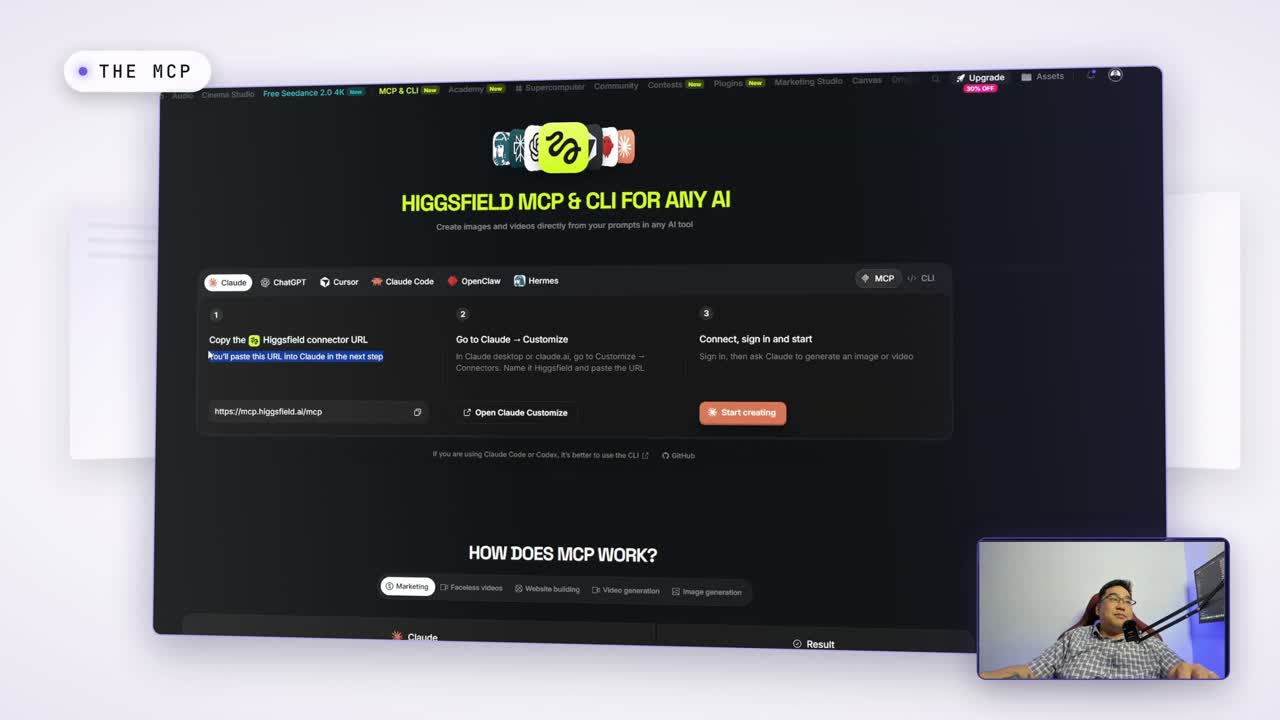
Connecting it takes a minute. Copy the connector URL from the MCP page, open Claude, go to Customize, then Connectors, add a custom connector, paste the URL and name it. Sign in once. That is it. From then on Claude can generate an image or a video from a plain sentence.
One Line, Off My Own Brand Kit
I have a branding kit, so the prompt I typed was simple: use Higgsfield to create a branded YouTube video cover for a Higgsfield explainer, using their logos, in a gif style. Then I went and did something else while it worked. That is how this actually gets used. You are not sitting there waiting. You are editing a video in one window while a cover renders in another and a batch of clips generates in a third. My computer was working overtime on camera, and it was fine.
The Assets, Including the Bald Ones
While the cover rendered I gave a tour of what I had already made. Little chart animations and motion graphics for videos. An anime scene it made from a character I built. A contractor ad with a voice on it, cut from a video we uploaded. Three D models. Voices. Pieces for my website. Most of it was made in a couple of weeks of playing, not months.
It also messed up. I uploaded a bunch of versions of myself and it gave me a buzz cut. Twice. I told it to buzz off the bald stuff and it gave me the buzz. I was embarrassed, and I am telling you anyway, because this is the rule: AI will be AI, so always watch your work before it goes out.
The Thumbnails Came Back With Me in Them
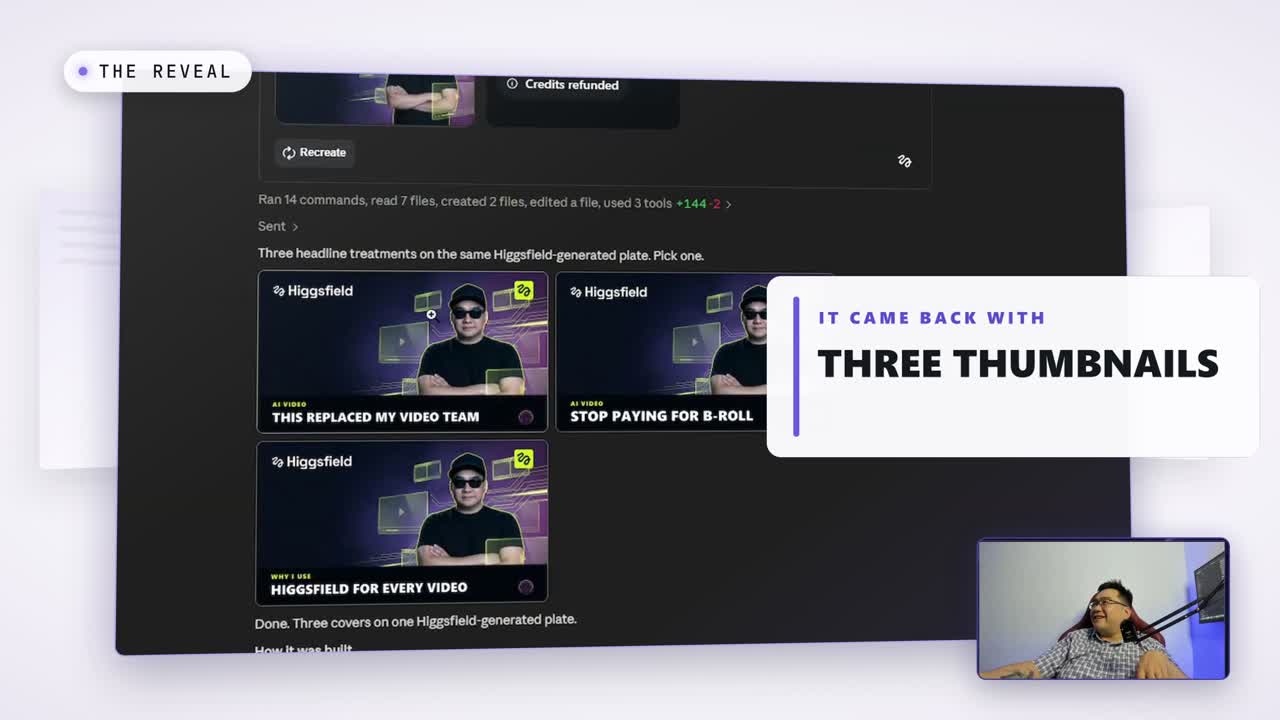
By the end of the video the cover request had turned into three cinematic YouTube thumbnails, with my face in them, using the model Nano Banana Pro. That was for the next video, made while I was recording this one. Earlier it had put two pictures together into a castle scene, people walking straight toward it, a little glow, a gust of wind, and told me the sound design too. Easy work.
The gallery is the other thing worth your time. Other people upload profile kits and build whole scenes between characters, and they leave the prompts. You do not have to be fully creative. A lot of getting good at this is copying people who are, and seeing what techniques you can come up with from there.
Why This Matters for Bay Area and San Jose Businesses
If you run a business in San Jose and you have ever paid for a graphic, a product shot, a social clip or a thumbnail, this is the tool that replaced my video team. Not because the output is always right. Because the cost of trying is nothing, so you try twenty things and keep two. A designer in Silicon Valley bills for the twenty. The knowledge gap is going to get extremely large between the businesses that learn this and the ones that keep paying per graphic.
And the deeper habit is the one I keep repeating on the channel. You do not ask the AI for help anymore. You tell it what to do. Once you tell it how to do things, it is a different game.
Practical Steps
- Connect the Higgsfield MCP to Claude: copy the connector URL, Customize, Connectors, add custom, paste, sign in.
- Put your brand kit where Claude can read it, so every request starts from your logos and colors.
- Ask for one real deliverable first. A thumbnail for your next video, a hero image for your site.
- Generate ten or twenty variations and pick, instead of prompting once and settling.
- Watch your work. Every image, every clip, before it ships. It made me bald.
Watch the Tour
Claude Code can also connect to FFmpeg and cut the video itself, but that is a whole other post. For now, if you want your graphics, your site and your automations built so that you own them, On Point Tech Solutions is a Go High Level consultant in Los Gatos serving San Jose and the Bay Area. Done for you, or taught with an SOP. Want to build this yourself? Join the On Point Tech Academy. It's free, and we build live every Tuesday and Thursday.
The On Point Tech Academy costs nothing and never asks for a card. We build live every Tuesday and Thursday, 12:30 to 1:30 PT.
Join the Academy free ← Back to all Field Notes