Key takeaways
- A page that records a short voice answer was opened from a link in a message. On a phone, that link opened inside the messaging app's own built-in browser, not a real one.
- Those built-in browsers often expose no microphone interface at all. Asking for the microphone then fails instantly, before any of our error handling even exists to catch it.
- So the button sat on its loading state forever and the person was shown nothing. It came back to us as "the link did not work", which is the least useful bug report there is.
- The fix: check what the browser can do when the page loads, not when the button is tapped, and say plainly what to do about it.
- Translate the browser's own error names into instructions a non-technical person can follow, and give them a copy link button, because that button is the actual fix.
When somebody applies to join our sales team, the next step is a short voice screen. A page asks questions, they tap a button, answer out loud, and the recording comes to us. It tells us more about how someone sounds on the phone than any resume.
It worked every time we opened it ourselves.
Then the first real applicant opened it, and the button said Starting... and stayed that way.
She had nothing to report. No error, no message, no screen to take a picture of. What reached us was the only description available to her: the link did not work.
Where the link actually opened
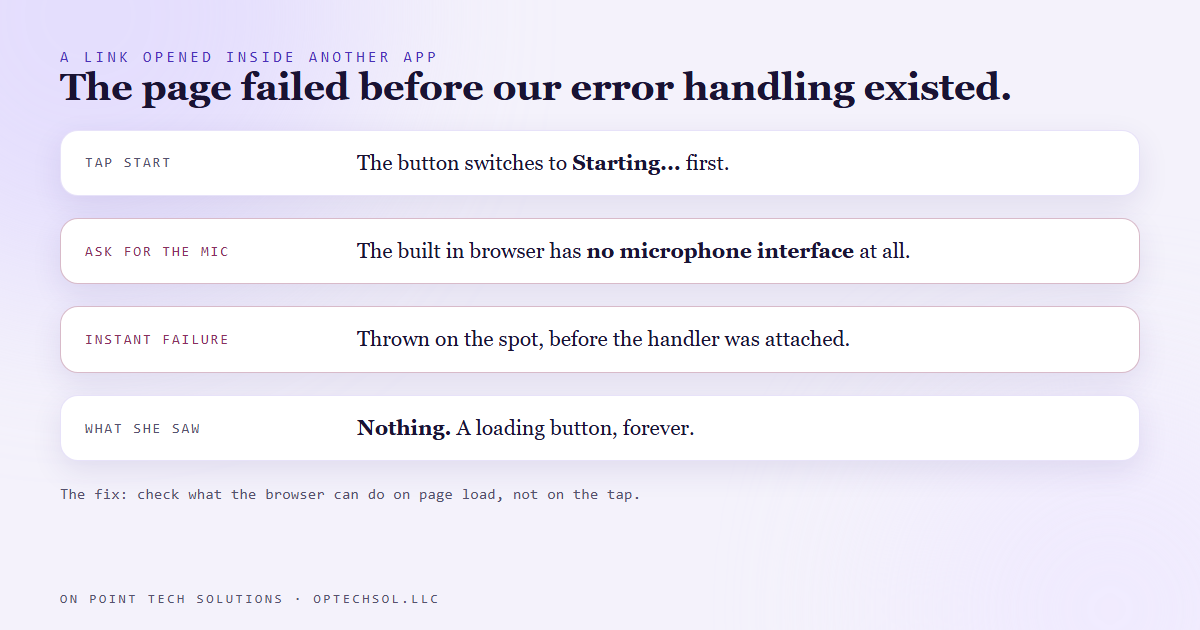
The link reached her in a message. On a phone, tapping a link inside an email app or a social app very often does not open your normal browser. It opens a small browser built into that app, so you never leave it.
Those built-in browsers look like the real thing. They load pages fine. What they frequently do not include is access to the microphone or camera. And not in a polite, permission denied way. The part of the page that would normally offer the microphone simply is not there.
Our page reached for it anyway.
Why none of our error handling ran
This is the part worth understanding, even if you never write code, because it explains a whole family of "it just hangs" problems.
Asking a browser for the microphone is normally a request that finishes later. The page asks, the browser shows a permission prompt, and some time afterwards the answer comes back, yes or no. Our code was written for that: ask, then handle the answer, including the no.
But when the microphone interface does not exist at all, the request never gets as far as being a request. It fails on the spot, the instant the page tries to reach for something that is not there. The "handle the answer" part had not been attached yet. So nothing handled it.
The button had already switched to its loading state before asking. With no answer ever arriving, it had no reason to switch back. The page was not broken in any way that showed. It was waiting, politely, for something that had already failed.
We reproduced it exactly by pretending, in a normal browser, that the microphone interface did not exist. Same stuck button, same empty screen.
What we changed
First, the check moved to page load. Before the person has tapped anything, the page now asks three questions quietly. Is this a secure page? Does this browser offer a microphone at all? Can it record audio? If any answer is no, the start button is disabled and the page says why, right away, before anyone has spent time or hope on it.
Second, the message names the real fix. If it looks like a built-in app browser, it says so: this page opened inside another app, tap the menu and choose open in browser, or paste the link into Chrome or Safari.
Third, there is a copy link button next to that message. It sounds like a consolation prize. It is not. For somebody on a phone inside an app, copying the address and pasting it into a real browser is the entire solution, and making them find the address bar themselves is where most people give up.
Fourth, the page still checks again on the tap, because permissions and devices can change between loading a page and pressing a button. And the request is now guarded against both kinds of failure, the instant one and the later one.
Errors written for people, not for developers
The last change was small and made the biggest difference to the humans on the other end.
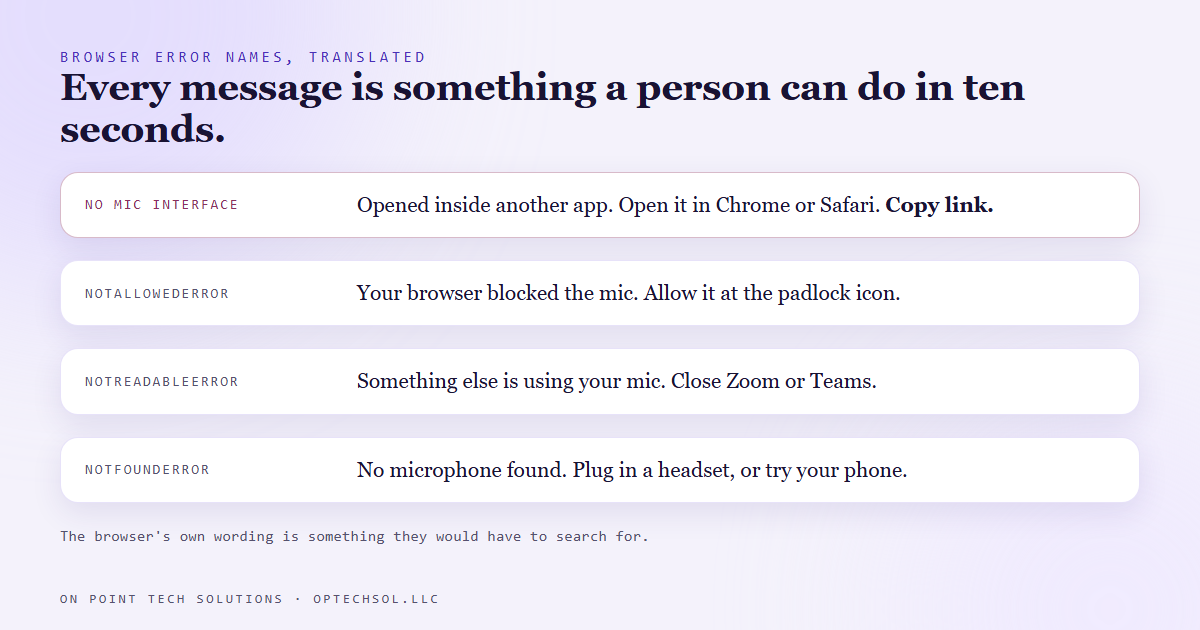
When a microphone request fails normally, the browser hands back an error with a name. Not allowed. Not readable. Not found. Those names are useful to a developer and meaningless to an applicant.
So each one now maps to an instruction. Not allowed becomes: your browser blocked the microphone, look for the mic or padlock icon in the address bar and allow it. Not readable, which usually means another app is already holding the microphone, becomes: close Zoom, Teams or any other tab that might be listening, then tap start again. Not found becomes: plug in a headset or try your phone.
Every one of those is something a person can do in ten seconds. The browser's own wording is something they would have to search for.
What this means for your business
If your website asks for a microphone, a camera, a location, a file upload or a payment, a real share of your visitors are arriving from inside an app. Social posts, email campaigns and text links all tend to open that way on a phone.
Test your important pages the way customers actually reach them. Send the link to yourself in a message, tap it on your phone, and use the page inside that app. Not in your desktop browser with everything logged in.
And look hard at any loading state that can wait forever. A spinner with no timeout and no fallback message is a page that will eventually show someone nothing at all. Every marketing automation San Jose business depends on is only as good as the moment the person on the other end taps the button.
Want this built for you
We build websites, funnels and hiring flows that are tested on the phone in your customer's hand, not just the laptop on our desk. Want to build this yourself? Join the On Point Tech Academy. It's free, and we build live every Thursday.
The On Point Tech Academy costs nothing and never asks for a card. We build live every Thursday, 12:30 to 1:30 PT, with whatever AI you use.
Join the Academy free ← Back to all Field Notes