
Key takeaways
- We published a lead automation through the API. Its logs showed every test lead qualifying, and not one of them was ever run through it.
- A workflow's trigger is its own record with its own on switch. Setting a workflow back to draft turns its triggers off. Publishing it again through the API does not turn them back on.
- The publish button in the interface does both halves. Our script did one, so it looked exactly like a broken step inside the workflow.
- Brand new workflows never showed it, because triggers are created switched on. Only workflows that had ever been paused were affected.
- The fix is a second call that switches the triggers on, then a check that counts the active triggers on read-back instead of trusting the workflow's status.
We build CRM templates that get copied into new client accounts, and a template like that carries a lot of automations. Clicking publish on each one by hand in every new account is the kind of job that gets done wrong on the fourth account. So we publish them with a script.
The script is simple. It reads each workflow, checks it is not about to publish something empty, and sets its status to published. The status comes back as published. By every measure the script looked at, the job was done.
On August 31 we ran a real test lead through the speed to lead automation in one of those templates. It is the workflow that fires the moment a new lead arrives. Nothing happened. We ran it again. Nothing again.
Qualified, and never run
The obvious read of a failed automation is that a step inside it is broken. A bad field, a missing sender, a condition that never matches. We went looking there first, which is where anyone would look.
The trigger's own log said something stranger. Every test lead showed up as qualified. The trigger had seen each lead, checked it against its rules and said yes. And no run of the workflow had ever been created for any of them. The trigger was saying yes and nothing was acting on it.
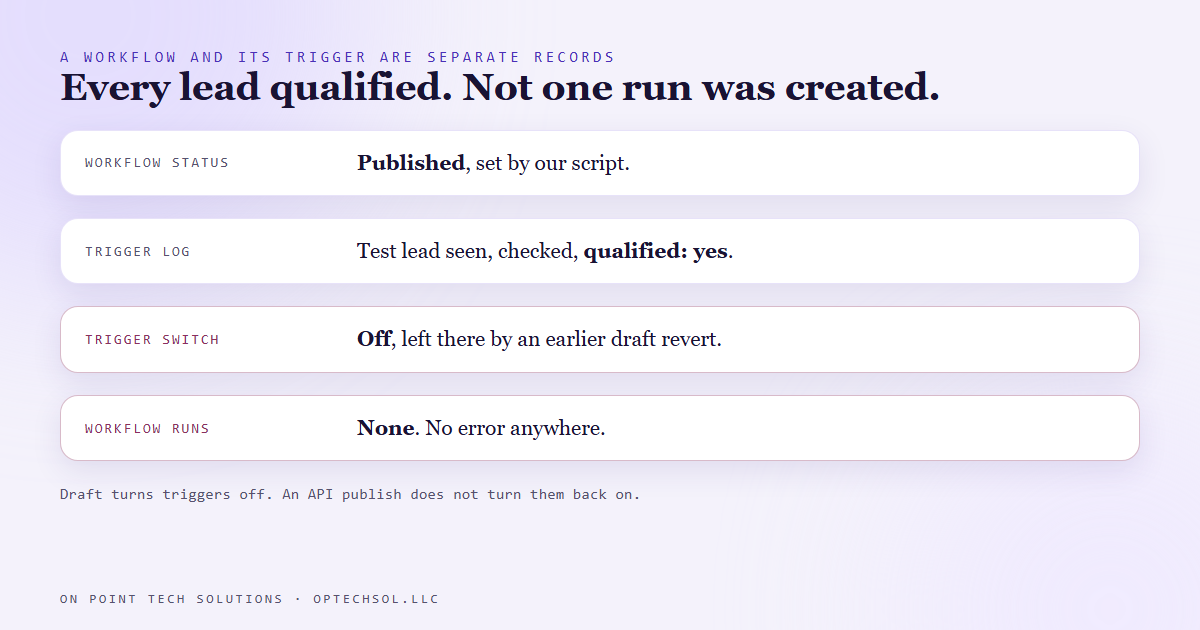
So we pulled the trigger itself, not the workflow. It carried its own active flag, and the flag was false.
Two switches, and only one of them moves both ways
Inside the platform, a workflow and its trigger are separate records. The workflow has a status. The trigger has an on switch of its own.
When a workflow is set back to draft, the platform switches its triggers off as well. That part makes sense. When the same workflow is set to published again through the API, the platform leaves the triggers exactly as they were. Off.
The publish button in the interface does both. It sets the status and it switches the triggers back on, so nobody who works in the interface ever sees this. Our script set the status and stopped, because the status was the only thing we knew to set. An interface button that does two things and an API call that does one of them are not the same action, even when they share a name.
It also explains why the script had worked before. A trigger is created switched on. A fresh workflow that goes from built to published without ever being paused has a live trigger the whole time. The ones that silently died were the ones somebody had set back to draft at some point, for an edit or a test.
One extra call that switched the triggers on, and the whole test ladder passed.
The fix, and the second trap inside it
Every publish in that script now does two writes. It sets the status, then it sets every trigger on. Unpublishing does the reverse and switches them off on purpose.
The second write hit its own problem. Every save to a workflow bumps a version number, and the platform refuses a write that carries an old version. The status change had just bumped it. So the trigger write, sent with the version we had read before, came back refused as outdated. On September 6 that made three unpublishes report as failed when the status change had actually landed. A false failure on a command like that is dangerous, because the person reading it runs it again. Now the script reads the workflow fresh between the two writes.
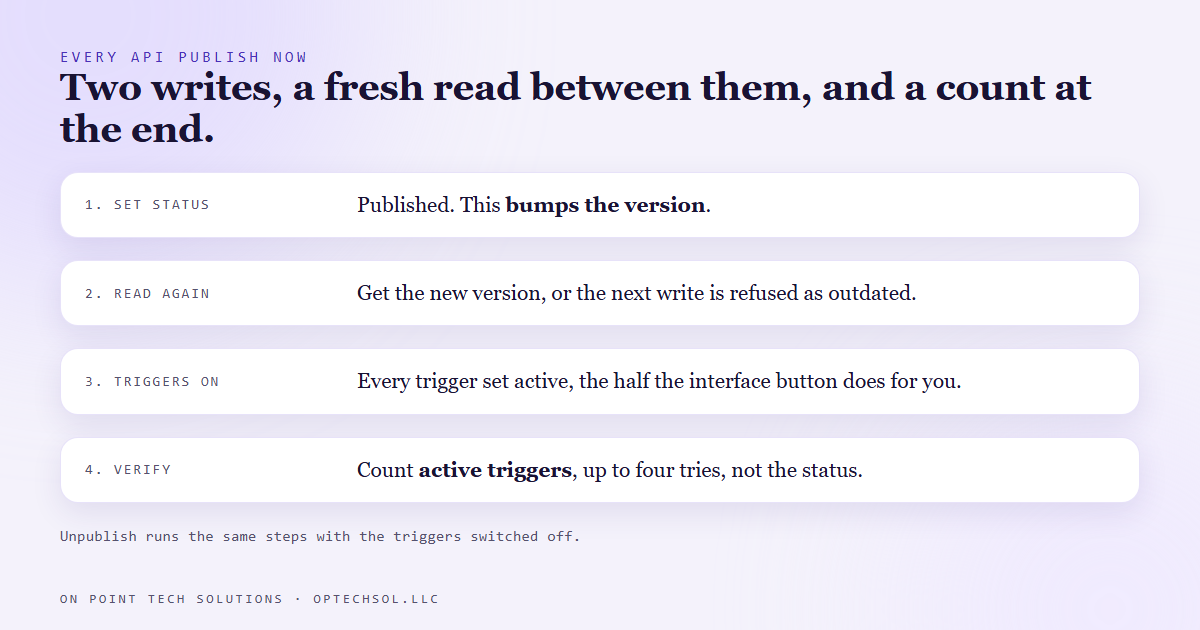
The check changed too. The script no longer asks whether the workflow says published. It counts the triggers that are switched on and compares that to the number the workflow has. And because the platform's read-back can lag its own writes by a moment, it tries up to four times with a short pause before it calls anything a failure.
What this means for your business
If someone manages your automations through an integration or a script rather than the screen, ask them one question: when you publish, do you check that the trigger is on, or that the status says published? Those are different answers, and only one of them means leads are being worked.
If you work in the interface yourself, the same lesson applies in a smaller way. After you pause and republish an automation, send one real test through it and look for a run in the history. A green status tells you the workflow is published. Only a run tells you it is working.
For any Go High Level Bay Area business running speed to lead, check the execution history of that workflow this week. If leads are arriving and the history is empty, it is worth looking at the trigger before you rebuild anything.
Want this built for you
We build CRM automations and the tooling that deploys them, and we verify them by watching them run. Want to build this yourself? Join the On Point Tech Academy. It's free, and we build live every Thursday.
The On Point Tech Academy costs nothing and never asks for a card. We build live every Thursday, 12:30 to 1:30 PT, with whatever AI you use.
Join the Academy free ← Back to all Field Notes