Key takeaways
- Two AI assistants share one chat window inside our member portal. One fronts it for clients and members, the other only ever arrives by a handoff.
- Neither is allowed on the other's channel. That channel assignment is the routing, and it is the whole design.
- Adding a chat widget somewhere new quietly changes who answers, because the widget type decides the channel and the channel decides the agent.
- The gate on the internal one is an honesty check, not a login. That shapes what is allowed to be in its knowledge base.
- The setting that says which agent goes first cannot be read back on any API surface we found, so the only honest proof is opening the chat and asking.
Our member portal has one chat bubble in the corner. Behind it there are two AI assistants doing two different jobs, and which one you get is decided before you type a word.
That sounds like an implementation detail. It is the product.
The setup, in one paragraph
The portal is where clients get their onboarding material and where free Academy members watch their courses. Same door for both. One assistant, the front desk, answers everything that comes in there: where is my course, what happens next in my build. Calm, service voice, no internal detail.
The second assistant answers internal operations questions for our own team. How does this automation work, what is the process for this, where does that live. She is not on the widget at all. She is reachable only when the front desk hands the conversation to her, which happens when somebody asks an internal question and identifies themselves as being on the team.
The routing is the channel, not a rule you write
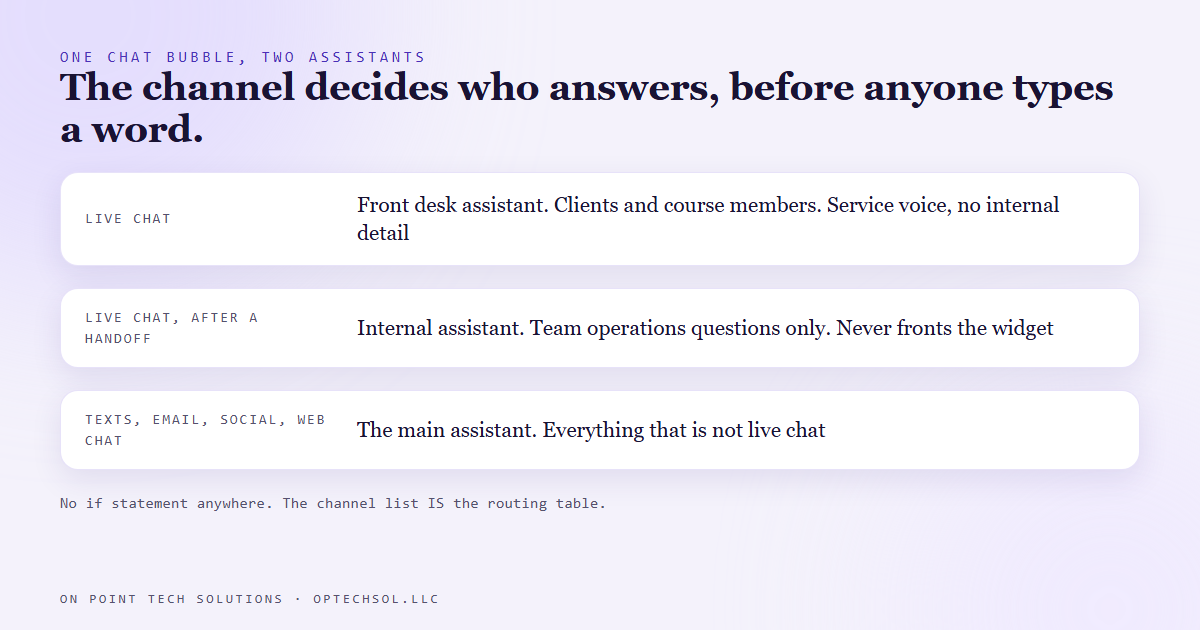
You do not route these agents with logic. You route them by which communication channel each one is allowed on. Our platform lets an agent be assigned to text messages, email, the social inboxes, the general web chat, and the live chat, in any combination.
The two portal assistants are assigned to live chat and nothing else. Our main assistant, the one that has handled texts and social messages for a long time, is assigned to everything except live chat. So live chat belongs to the pair, and every other conversation belongs to her. There is no if statement anywhere. The channel list is the routing table.
Which has a consequence people miss until it bites. If we later add a customer facing live chat widget on the public website, that widget lands on the portal pair by default, because it is the same channel. A visitor asking about pricing would get the portal front desk instead of the assistant who knows the sales answers. The fix is not code, it is choosing a different widget type so it maps to a different channel.
Generalise it and it applies to any marketing automation San Jose businesses put in front of customers. When you assign a bot to a channel rather than to a page, you have made a decision about every future page on that channel. Write it down somewhere, because the person who adds the next chat widget will not be thinking about it.
The gate is honesty, and that is on purpose
The internal assistant answers questions about how our operations run. A reasonable instinct is to lock that behind a login. We did not, and the reasoning is worth being explicit about.
The handoff fires when somebody asks an operations question and either names themselves as a team member or says yes when asked. That is an honesty check. Anyone determined to lie their way past it can.
So we did the other half of the work. Nothing behind that gate is actually secret. No credentials, no client data, no keys, no numbers that would hurt us in a negotiation. What she can talk about is how our automations are put together, which is the same material we already publish in a team course that a single tag unlocks.
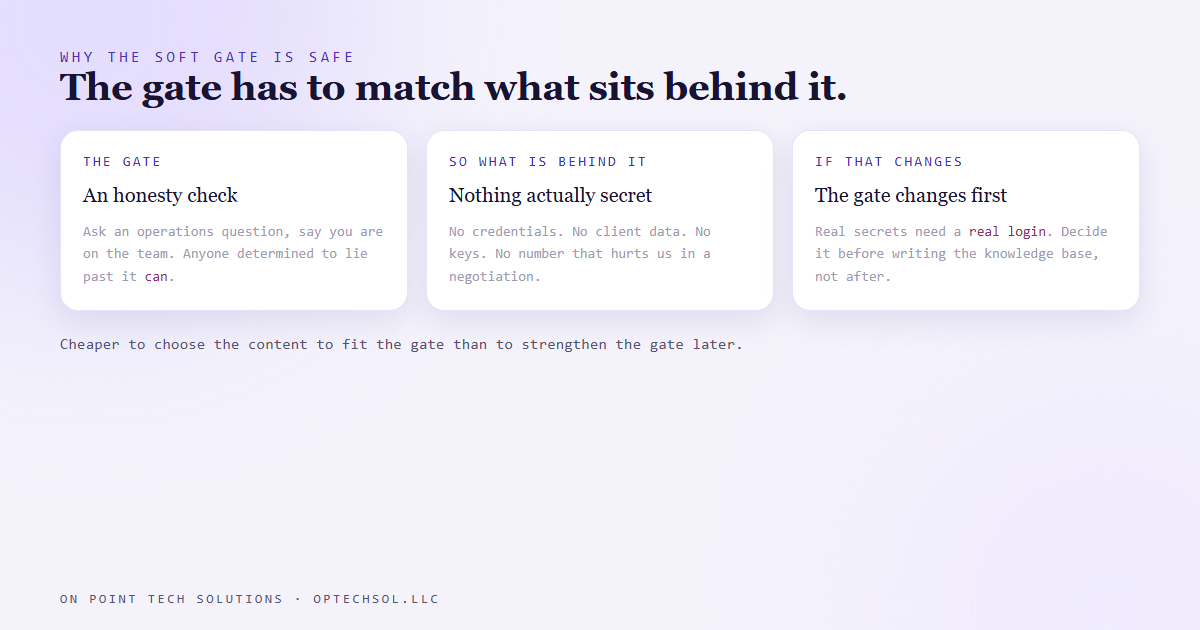
That is the rule underneath: the strength of the gate has to match the sensitivity of what is behind it. If we ever want her holding real secrets, the gate has to become a real login first. Deciding that before writing her knowledge base is much cheaper than deciding it after.
The setting we cannot read
One agent has to be marked as primary, so a brand new conversation starts with the right one. We set it. It works.
We also cannot read it back. Not from fetching the agent, not from searching agents, not from anything else we tried. The value goes in and never comes out. The interface shows a marker, and a live conversation behaves correctly, and that is the entire body of evidence available.
We have hit this exact shape of problem enough times now that it is a house rule. When a platform will not hand back the thing you wrote, the only honest verification is behaviour. Open the chat. Ask a client question and check who answers. Ask a team question and check that it moves to the other one. Two questions, one minute, and it is worth more than any status field.
What this means for your business
Most small businesses adding an AI assistant add exactly one and point it at everything. That works until the day two different kinds of people are talking to it, at which point one of them is getting the wrong voice.
Three things to take from this. Decide who each assistant serves before you write a word of its instructions, because the audience decides the tone and the tone is most of the value. Understand what your platform routes on, since assigning by channel means every future page on that channel inherits the decision. And when you cannot read a setting back, test it by using it, not by staring at an API response and hoping.
One more, quietly the most important. Conversations from both assistants land in the same shared inbox as everything else, so a human can read what the bots said and take over any of it. An assistant that talks to your customers in a place you cannot see is not an assistant, it is a liability.
Want this built for you
We build AI front desks that know who they are talking to and hand off cleanly when they should. Want to build this yourself? Join the On Point Tech Academy. It's free, and we build live every Tuesday and Thursday.
The On Point Tech Academy costs nothing and never asks for a card. We build live every Tuesday and Thursday, 12:30 to 1:30 PT.
Join the Academy free ← Back to all Field Notes