
Key takeaways
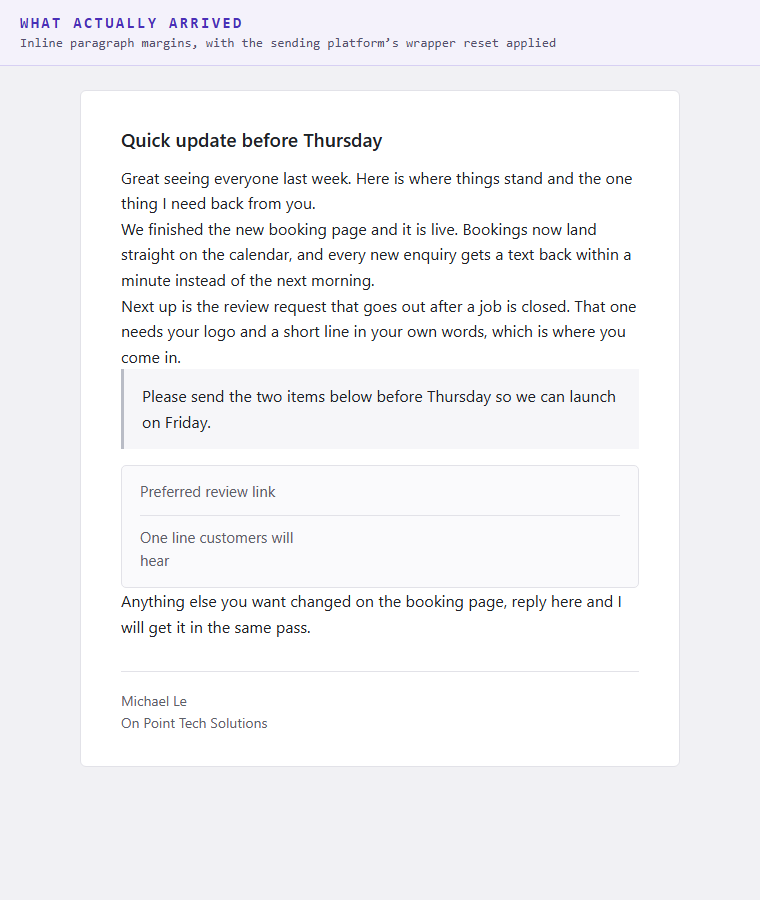
- Sixteen emails went out looking clean in the draft and arrived with every paragraph stacked flush against the next one.
- The cause was not the HTML. The sending platform's own stylesheet resets paragraph margins, so any paragraph relying on default spacing loses it.
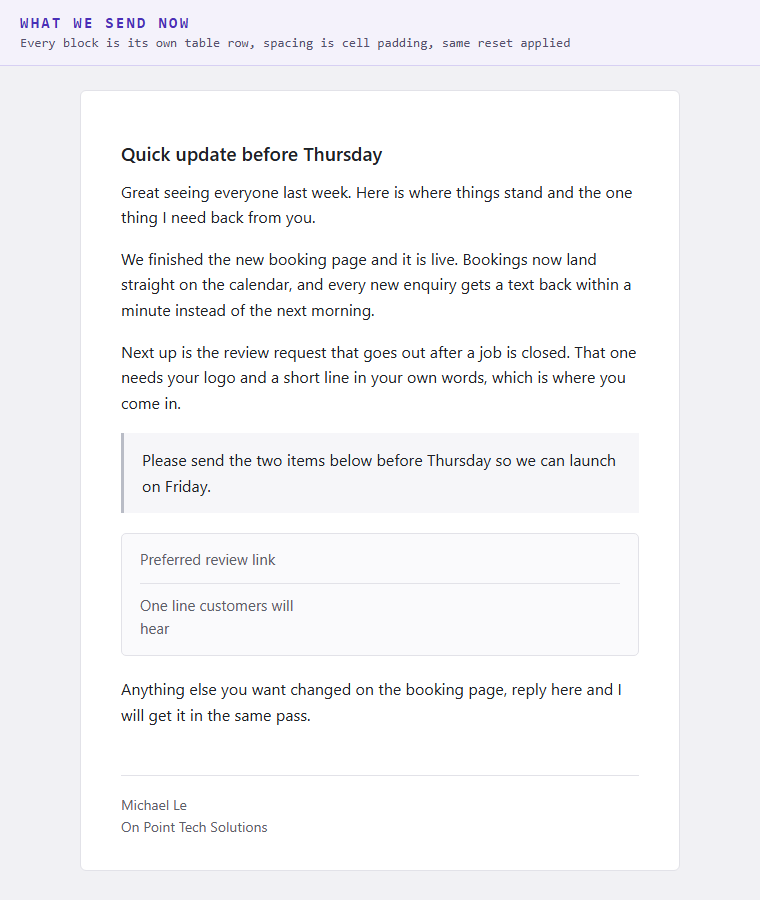
- The fix is structural. Every block is its own table row and the spacing is cell padding, which no stylesheet reset and no Outlook renderer can strip.
- A browser preview proves nothing here, because the platform rewrites the HTML on the way out. The only honest test is sending it to yourself and opening a real inbox.
- The known bad version was kept in the code as a control, so the comparison can be re-run instead of re-argued.
Sixteen emails went out to a local networking group. Nothing complicated. A short update, a few paragraphs, a couple of links.
They arrived looking like a wall. Every paragraph flush against the one above it, no breathing room anywhere, the kind of email you close before you read it. The draft had looked completely fine.
The HTML was correct and it still broke
The first instinct was that the HTML had not gone through. It had. Reading the sent message back out of the platform confirmed the content type was HTML and the body was intact, exactly as written.
So the markup arrived. What died was the spacing.
The reason is a single line in the platform's own email wrapper stylesheet. It sets paragraph margins to zero. That is not unusual, plenty of email systems normalise spacing that way, and on its own it is harmless. It becomes a problem the moment your content depends on the default margin a paragraph normally gets from the browser.
A bare paragraph has nothing of its own to defend with. The wrapper resets it, and every gap in the message closes at once.
Spacing that cannot be reset away
The fix is not a better margin. It is not using margins for spacing at all.
Every block in our emails now renders as its own row in a six hundred pixel table, and the space between blocks is padding on the table cell. A stylesheet reset cannot reach into cell padding. Neither can Outlook, which renders email through Word and throws away a good deal of modern layout on the way.
Two more rules came out of the same session. No stylesheet block anywhere in the email, because some webmail clients strip them entirely, so every single style is written inline on the element it affects. And no empty stub lines. Asking somebody for their Instagram by writing a bullet that says Instagram with nothing after the colon looks broken, so a request for information renders as a bordered fill in table instead.
The test that actually settles it
Here is the part that cost the most time and is the most transferable.
Opening the rendered HTML in a browser tells you almost nothing. The platform rewrites the message on the way out. What your browser shows is the file you made, not the email anybody receives.
So both versions were sent for real, to a live contact, and compared in an actual inbox. The table version won, twice, on two separate asks. That is the default now and it stays the default until somebody repeats that test, not until somebody has a better opinion.
The losing version is still in the code. It is kept deliberately, with a warning printed when anyone selects it, purely as a control. If the platform ever changes its wrapper, the comparison can be run again in ten minutes instead of being rebuilt from memory. Deleting the thing you proved wrong feels tidy and destroys the evidence.
Two smaller traps in the same area
When you send an email through a CRM, the status field on a fresh send usually comes back empty. Empty means no verdict yet. It does not mean delivered, and reporting it as delivered is how a bounced message gets marked done.
And do not go looking for the message straight away. Delivery plus inbox indexing runs a minute or more behind, so searching seconds after sending returns nothing and looks exactly like a failed send. That one sent an entire investigation chasing a problem that did not exist. Wait, then look.
Why a GHL consultant Bay Area business should care
Most local businesses send email through a CRM or a booking system rather than from a mail client, and almost nobody looks at what arrives. The draft looks good in the composer, the send reports success, and that is where checking stops.
Three things worth doing this week:
- Send your own template to yourself and open it on a phone. Not a preview. A real send, a real inbox, a real thumb scrolling. Most formatting problems are visible in four seconds.
- Stop relying on defaults for anything that matters. Spacing, font size, link colour. If it works because nothing overrode it, something eventually will.
- Check what a failed send actually looks like in your system. Learn which field reports a real failure and which one is just empty, before you need to know.
The honest lesson is that we shipped sixteen broken emails to real people, and none of the checks in place at the time could have caught it, because every one of them looked at the wrong artifact. The draft was fine. The HTML was fine. The send succeeded. The email was still bad.
Anything that leaves your business and reaches a customer deserves one look at the actual thing the customer sees. If your emails, forms or follow ups are going out unchecked, that is fixable, and it is most of what we do. Want to build this yourself? Join the On Point Tech Academy. It's free, and we build live every Tuesday and Thursday.
The On Point Tech Academy costs nothing and never asks for a card. We build live every Tuesday and Thursday, 12:30 to 1:30 PT.
Join the Academy free ← Back to all Field Notes