Key takeaways
- On our store's mobile menu, tapping a link that opened a pop up form left the whole page dead once the pop up closed. Nothing open, nothing tappable, and the only way out was a reload.
- Both the menu and the pop up save one page setting when they open, the one that decides whether anything can be tapped, and put it back when they close. The pop up saved the menu's "nothing is tappable" and faithfully put it back.
- It took three deploys. A zero delay did not work. A fixed delay passed on our machine and failed once deployed, which is the reliable sign that a delay is the wrong tool.
- What worked was checking the actual state: wait until the menu is really gone, clear any leftover lock, then open the pop up against a clean page.
- Testing it had its own trap. A hidden browser window slows timers down so much that a working fix can look broken.
On a phone, the navigation on the store where we sell tap cards lives in a menu that slides in from the side. One of the links in that menu opens a pop up with a form in it.
In August that link started killing the page. Open the menu, tap the link, fill in or close the pop up, and the site stopped responding. Every button, every link, every field. No pop up on screen, no menu on screen, just a page that looked normal and ignored every tap.
A reload fixed it. That is worse than it sounds. A visitor who hits a dead page does not reload. They leave, and they do not tell you why.
Two layers, one saved setting
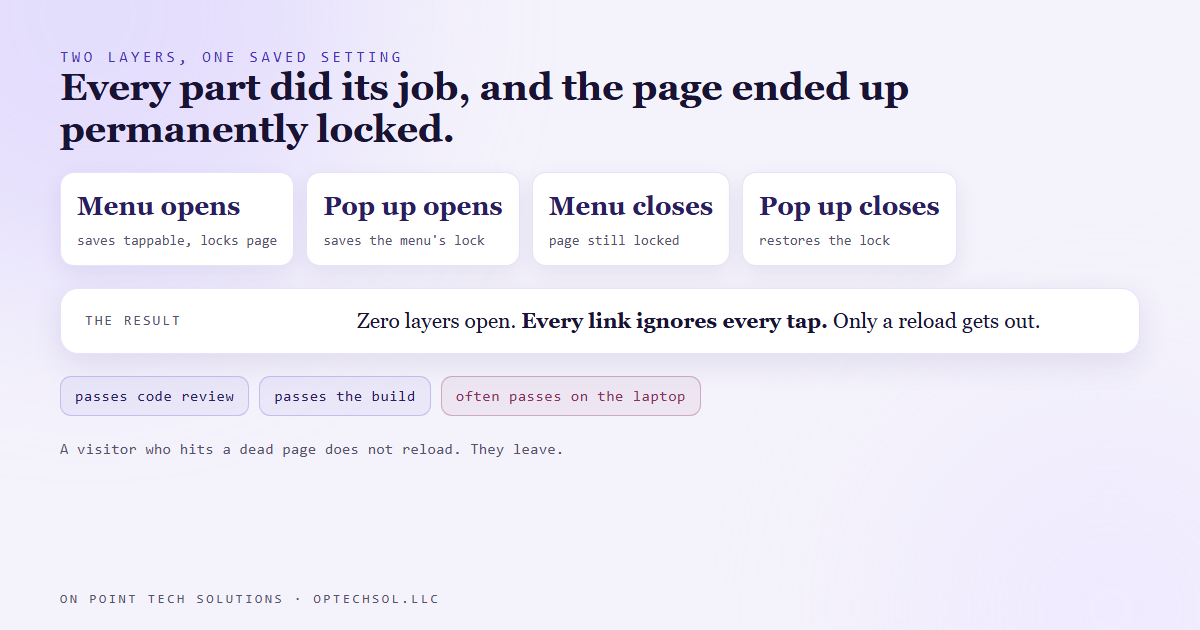
The menu and the pop up are both built from the same family of interface parts, and both do something sensible. While one is open, the page behind it should not react to taps, so each one switches off tapping on the page when it opens. Before switching it off, it saves whatever the setting was. When it closes, it puts that saved value back.
That works perfectly for one layer at a time. Here is what happened with two.
The menu opens and saves "tappable", then switches the page to "not tappable". The link inside the menu opens the pop up while the menu is still on its way out. The pop up saves the current value, which is the menu's "not tappable". The menu finishes closing. Then the pop up closes and restores exactly what it saved.
Every part did its job. The result was a permanent lock, left behind by two layers that were no longer there.
The fixes that did not work
The first attempt was to close the menu and open the pop up on the next tick, a zero delay. Both layers were still on screen at the same moment. The menu lost focus to the pop up before its closing animation finished, the signal that the animation had ended never arrived, and the menu never fully went away. Its lock was never released at all.
The second attempt was a fixed delay, a little longer than the menu's closing animation. That stopped the visual overlap. It did not stop the lock, because the menu had still not released it when the pop up opened. It also passed on our own machine and failed once deployed. When a fix depends on timing and works in one place but not another, the timing was never the real fix.
There was a third idea we ruled out after measuring it. One common way to schedule work for the next screen repaint does not run at all while the browser tab is in the background. We counted zero calls per second in a hidden tab. A visitor who switches apps at the wrong moment would freeze the whole flow, and the code that unlocks the page is the last thing you want to depend on a tab being visible.
What works
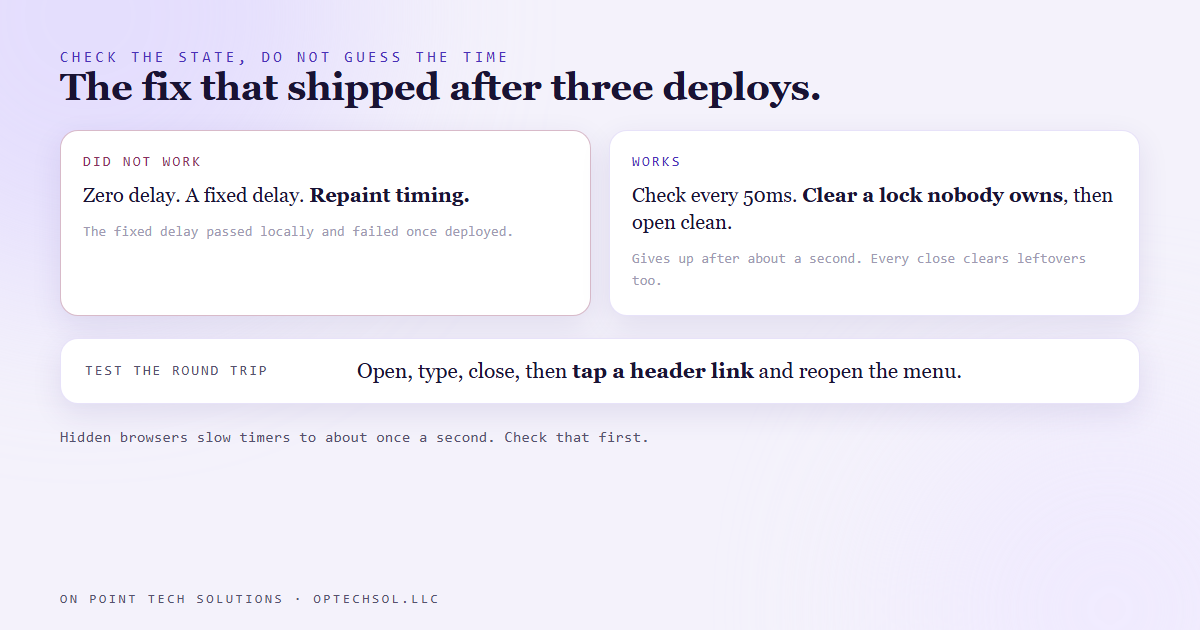
The fix that shipped checks the state instead of guessing the time.
After the menu closes, a small check runs every fifty milliseconds. If a layer is still on screen, it waits and checks again. If nothing is on screen but the page is still locked, that lock is a leftover with no owner, so it clears it and then opens the pop up against a clean page. That way, when the pop up closes, the value it restores is the right one.
The check gives up after about a second so no future change can hang the menu forever. And every pop up also clears a leftover lock on its way out when no other layer remains. Belt and braces, because a dead page is the worst failure a store can have.
Testing it was its own trap
We check changes in a browser we can drive, and sometimes that browser runs hidden. Hidden browsers slow timers to about once a second. So "the pop up never opens" was, at one point, a working fix that opened after two seconds instead of a fraction of one.
Now the test checks whether the page is hidden before trusting any timing result, and it tests the full round trip, not just the open. One pop up open. Menu gone. The field accepts typing. After closing it, zero pop ups, the page unlocked, a header link actually clickable, and the menu opens again.
What this means for your business
This kind of bug passes code review, passes the build, and often passes on the developer's laptop. It shows up as "the site randomly stops working", on a phone, for a customer who will never report it. And most business owners check their own site on a desktop, where the slide out menu never appears.
Three things worth doing this week. Open your site on your own phone and tap every item in the menu, including anything that opens a pop up. Close each pop up and then tap something else on the page, because the bug lives after the close. And if your site stacks a chat widget, a cookie banner and a pop up offer, open all three together and see whether the page still responds.
For a GHL consultant Bay Area business, that last one matters most. Funnels love stacking layers, and a lead who taps a dead button does not try twice.
Want this built for you
We build mobile first sites and test the full round trip on a real phone. Start at optechsol.llc.