
Key takeaways
- Our hiring form creates a contact and a pipeline card, then hands the applicant straight to a voice screen that looks their application up.
- The create hands back an id that works instantly. A search for the same record finds nothing for several seconds. People click through in under one.
- So the first build told brand new applicants their application did not exist, and separately never moved their card, because that search came back empty too. Neither failure raised an error. We caught both in testing.
- Carry the id you were given forward instead of searching for what you just created. Where a search is unavoidable, do it at the end of the flow, not the start.
- If that id travels through somebody's browser, pair it with something they already know. Otherwise a guessed id opens a stranger's record.
When someone applies to join our sales team, the application is only step one. Straight after they submit, a button takes them to a short voice screen: a few questions, answered out loud, recorded and scored. It tells us more about how someone sounds on a call than anything they could type.
Behind that button, two things happen fast. The form writes a new contact into our CRM along with a card on the applicants pipeline. Then the voice screen opens and checks that this person really did apply, before it lets them record anything.
That check is where it went wrong.
Written is not the same as findable
The voice screen found the applicant the obvious way. It took the email address they had just typed and searched the CRM's contacts for it.
When we tested it, the search came back empty. Every time. The screen said it could not find an application for that email, to somebody who had submitted one about a second earlier.
Try the same search a minute later and the contact is right there. Nothing was wrong with the data. The contact existed. It just was not searchable yet.
This is a very common arrangement, and it is almost never written down. When you create a record, the platform saves it and hands you its id straight away. Fetching the record by that id works immediately. But search runs off a separate index, and that index catches up a few seconds later. We saw it directly: a search issued milliseconds after the write returned nothing, and the identical search a minute later returned the row.
A few seconds is invisible when a person creates a contact by hand and then goes looking for it. It is everything when the whole point of the page is to hand someone straight from the write to the read.
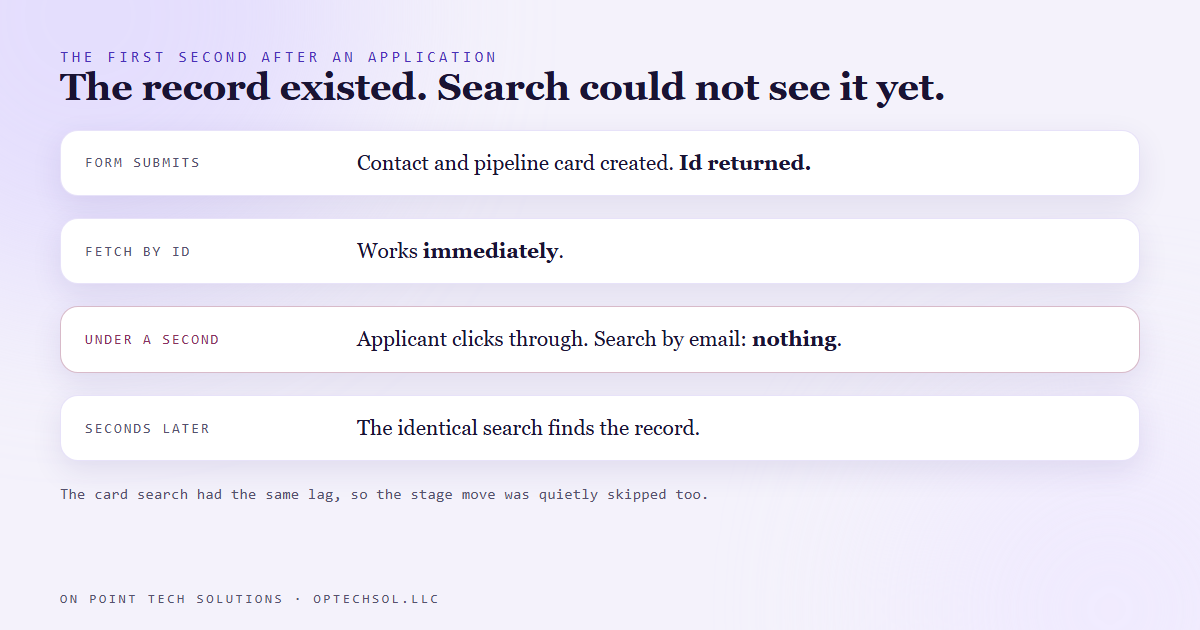
The second failure hid behind the first
There was another search in the flow. When the screen is finished and scored, the applicant's card moves to the screening stage. To move the card, the code first looked up the card by searching for open applications belonging to that contact.
Same index, same lag. And when the voice screen started, that lookup ran within a second of the card being created. It came back empty, the card id stayed blank, and at the end the move was quietly skipped.
No error anywhere. The applicant would have finished their screen, the recording and notes would have landed, and their card would have sat in the first column like they had never done it. That kind of bug does not make anyone complain. It just makes a good applicant look like they dropped out.
What we changed
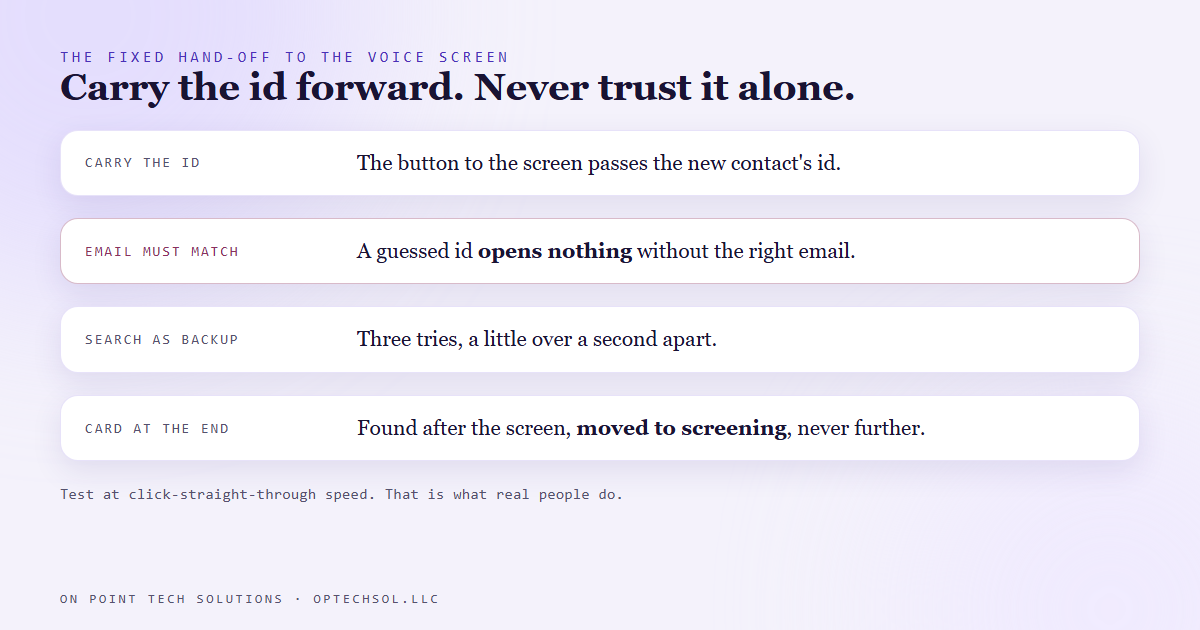
First, stop searching for something you just made. The form already receives the new contact's id the moment it is created. So the button to the voice screen now carries that id along with the email. The screen fetches the contact directly by id, which works instantly.
Second, the id is never trusted on its own. It passes through the applicant's browser, which means anyone could edit it, and ids are not secrets. If knowing an id were enough, guessing one would open somebody else's application. So the screen fetches the record by id and then checks that the email on it matches the email the person just typed. Knowing an id opens nothing. You have to know whose it is.
Third, the email search is still there as a backup, for somebody who comes back to the link later without the id. It now tries three times, a little over a second apart, instead of giving up on the first empty answer.
Fourth, the card lookup moved to the end. By the time a screen is scored, the person has been talking for several minutes, which is far longer than the lag has ever been. So the card is found then, when it is reliably findable, and moved to screening. Never further. Deciding who gets an interview stays a human call.
And the proof that someone applied is a tag the form puts on the contact, not the card. The tag is on the record the moment it is written, so a card that is still catching up does not stop anyone from starting their screen.
What this means for your business
Any flow that writes something and then immediately reads it back has this gap waiting in it. A booking form that shows a confirmation page pulled from the CRM. A checkout that looks up the order it just created. An automation that creates a contact in one step and searches for it in the next.
When you test those flows, test them at human speed and at click-straight-through speed. The slow test passes. The fast one is what your customers do.
Good marketing automation San Jose businesses rely on should pass ids forward from step to step rather than search for what it just made. If a tool you use can only look records up by name or email, put a delay before that step, or move it later in the flow.
Want this built for you
We build hiring funnels, forms and CRM automations that hold up when real people click faster than the platform can index. Want to build this yourself? Join the On Point Tech Academy. It's free, and we build live every Thursday.
The On Point Tech Academy costs nothing and never asks for a card. We build live every Thursday, 12:30 to 1:30 PT, with whatever AI you use.
Join the Academy free ← Back to all Field Notes