
The Local AI Guy: one story and one new thing to learn, every day, from Los Gatos.
I had a one-to-one with a bookkeeper from a BNI chapter here in the Bay Area, and she said something that stuck with me. When people nearby go looking for a bookkeeper, she's usually one of the first calls they make.
She knows exactly why, too. It's her reviews. Five stars, one after another, built up over time. She's watched it happen with her own eyes. The good reviews keep coming in, and the phone keeps ringing.
I love that, because it's so simple. She isn't chasing anybody. She does good work, and the proof of it sits right where a stranger can see it.
Your reviews are your front window
Think about walking down a main street looking for somewhere to eat. Before you go in, you glance in the window. Is it busy? Do the people inside look happy? That two-second look decides it.
For a service business, reviews are that window. Somebody who has never met you looks in, sees a row of happy customers, and picks up the phone.
Written reviews make a good window. A window with faces in it is better. When a real customer looks into a camera and says what it was like to work with you, in their own words and their own voice, people believe it in a way they don't quite believe text.
The hard part has always been collecting those videos. Most owners never ask. The ones who do usually end up paying for a separate video app every month just to gather a handful of clips.
What's new in HighLevel
On November 23, HighLevel put out a short video showing you can collect video testimonials right inside a normal GoHighLevel form. Your customer fills out the form and uploads their video. The file attaches to their contact record in your CRM (the customer database inside HighLevel), gets saved to your media storage, and is ready to put on your website or funnel.
You don't need another app for it. The same forms you already build for leads can do this job. Here's HighLevel's own walk-through if you want to watch it.
How to set it up
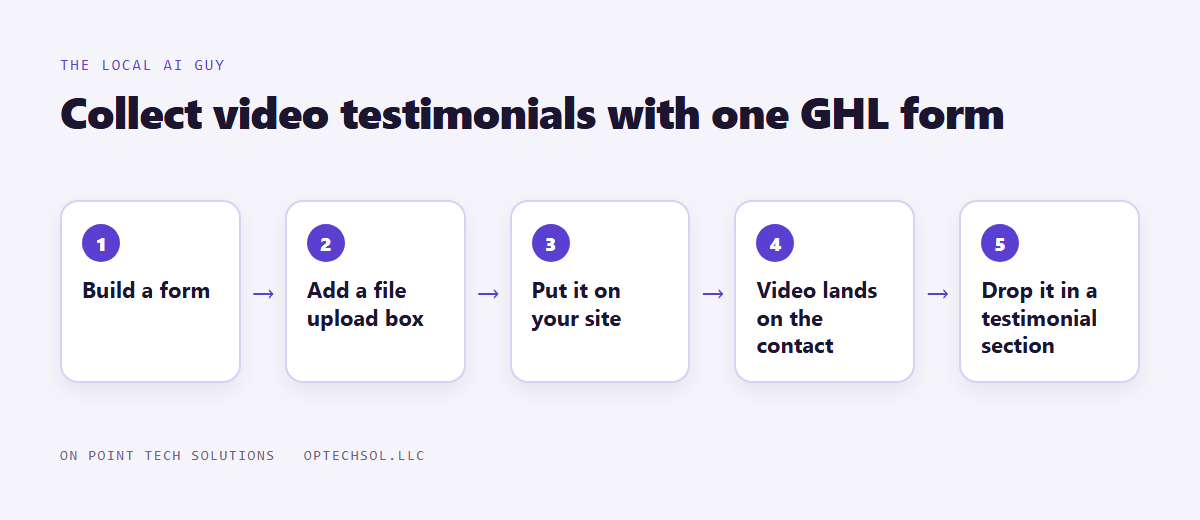
Here's the path HighLevel shows, in plain English.
Start in your sub-account, which is just your own business account inside HighLevel. On the left side, click Sites, then Forms, and create a new form. Add the basics first: first name, last name, phone and email, so you know who sent each video.
Then scroll to the bottom of the elements panel on the side until you see the file upload element. Drag it onto your form. That's the box where your customer attaches their video. Give the form a name at the top and click save.
Now put that form on a page of your funnel or website. Before you send anyone to it, click preview in the top right corner and fill it out yourself, video and all. You'll see exactly what your customer sees, right down to the thank-you message after they hit submit.
When a real video comes in, go to your contacts and open that person's record. On the right side, under the files they've sent, there it is. Click the three dots next to it to grab the file.
The last step is putting that face in your window. Open your funnel or website, click the plus button, add a pre-built section, scroll down to testimonials, and pick the video layout. Change the colors so it matches your brand. Then click the video element, set the type to hosted video, and upload the clip your customer sent. Once it finishes processing, save and publish.
One form and one section on your site. That's the whole build.
One thing I tell everybody before they turn this on: ask first. Only send the form to customers who are happy to hear from you, and say in plain words right above the upload box that their video may be shown on your website. With the customer's permission is the only way I'd ever run this.
Back to the bookkeeper
Her window is already full. Five-star review after five-star review, earned the slow way, one happy client at a time. That's the hard part, and she's done it.
What this adds is a couple of faces in that window. A few clients who already love working with her, saying so in their own voice. The next person who peeks in sees the stars, and then hears it from a real human being.
Same window. Just a lot harder to walk past.
Why this matters for Bay Area businesses
People around San Jose and the South Bay check you out online before they ever call. Reviews are word of mouth that strangers can read, and for most local businesses here word of mouth is the whole pipeline. A video testimonial on your website is about as close as you can get to having a happy customer standing in your lobby, telling the next person why they should pick you.
Good work earns the reviews. A simple form lets the people behind them show up too.
If you want to learn GoHighLevel and AI setups like this one step by step, come join the free On Point Tech Academy at optechsol.llc/academy.
See you tomorrow. Michael, The Local AI Guy.
The On Point Tech Academy costs nothing and never asks for a card. We build live every Thursday, 12:30 to 1:30 PT, with whatever AI you use.
Join the Academy free ← Back to all Field Notes