
Key takeaways
- Every hero image and diagram on this blog is drawn by a headless browser that takes a screenshot of a page and saves it as a file.
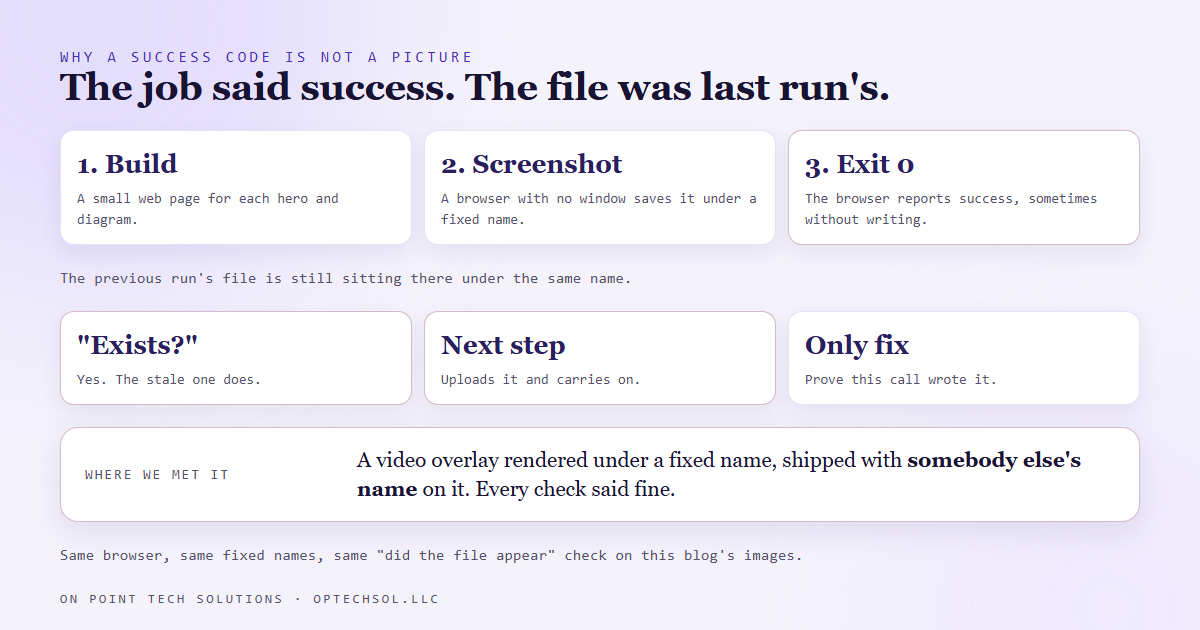
- That browser can exit with a success code and never write the file. If the previous run's file is still sitting there under the same name, a check that only asks "does the file exist" passes on a stale image.
- We learned this the expensive way on a video, which shipped with somebody else's name on it. Then we went back to the render job that draws this blog's images, because it worked the same way.
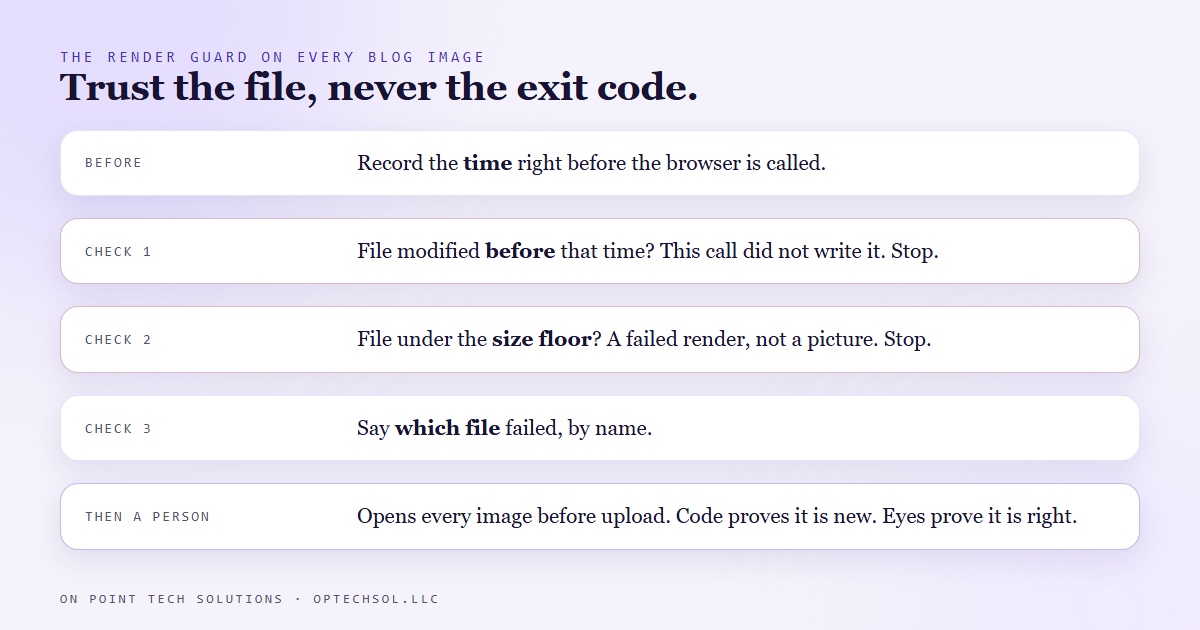
- The render scripts for this blog now refuse any file whose modified time is older than the call that was meant to write it, refuse any file under a size floor, and say which file failed.
- The lesson for any business: a job finishing and a job doing the work are two different facts, and most of the systems you rely on only report the first one.
If you run Go High Level in San Jose, you have a dashboard full of green checkmarks. Workflow ran. Email sent. Task complete. Every one of those tells you a step finished. Very few tell you the step did what it was for. This is a post about the gap between those two, and the small piece of code that closes it in our own image pipeline.
How the pictures on this blog get made
Every post here gets three images: a hero with my face and the headline, and two diagrams that explain the mechanism. None of them are drawn by hand. A script builds a small web page for each one, opens it in a browser with no window, takes a screenshot at the right size, and saves it as a file. Another script uploads those files and puts their addresses into the post.
It works well, it is free, and it runs every single day. Which is exactly why a quiet failure in it would be so easy to miss.
The failure we had already met once
We had seen this break before, on a video. A member spotlight came out carrying somebody else's name on it. The render step had drawn each overlay under a fixed file name, and on the fourth build in a row the browser reported success without writing anything new. The previous person's overlay was still sitting there under the same name, so the next step picked it up and carried on. Every check said fine. Only pulling a frame and looking at it caught it.
The honest part: when we fixed that video, the same exposure was sitting in every other render path in the repo, including the one that draws this blog's images. Same browser, same fixed file names, same "did the file appear" check. Fixing the video script did nothing for the others.
What the render step checks now
Every render script in this blog lane now does three things after the browser exits, and it does not trust the exit code for any of them.
- It notes the time before it starts. Right before the browser is called, the script records the clock.
- It checks the file is newer than that. If the file on disk was last modified before this call began, this call did not write it, and the script stops with the file's name.
- It checks the file is big enough. A real image at that size is never tiny. Anything under the floor is treated as a failed render, not a picture.
Then every image still gets opened and looked at before it is uploaded. Several times the diagrams have come out technically perfect and visually wrong, a column half empty, a headline that no longer matched what was drawn under it, and those got fixed and rendered again. The code proves a new file was written. Only looking at it proves it is the right picture.
Where this shows up in your business
You do not need a render pipeline to have this exact problem. You need anything that reports "done" on its own behalf.
- A cleaner who clocked out on time. What you wanted was a clean office.
- A delivery marked complete, which is really just the driver tapping a button, while the package may or may not be on your porch.
- An invoice marked sent, which tells you nothing about whether it reached the right address.
- A workflow in your CRM showing a green run, when the thing you care about is the right text reaching the right person.
Those status flags are useful, but they are the system reporting on itself. The habit worth building is to pick the few outputs that matter most and check the output itself, not the report about it.
What I would set up for a Go High Level San Jose account
For most local businesses on Go High Level in San Jose, three checks cover most of the risk.
- Check the artifact, not the status. For your most important automation, once a week, open one actual message it sent and read it as the customer would.
- Check the time. When a report says something updated, look at when. A dashboard showing last week's number with today's date on the page is the same bug as a stale file.
- Make failures say their name. When something does break, you want the message to tell you which customer, which file, which step. "Something went wrong" costs you an hour of digging.
This blog's images are a small thing. The rule that came out of them is one I would put on any system that matters: when a job says success, go check the thing it was supposed to make.
Want to build this yourself?
Join the On Point Tech Academy at optechsol.llc/academy. It's free, and we build live every Tuesday and Thursday.
The On Point Tech Academy costs nothing and never asks for a card. We build live every Tuesday and Thursday, 12:30 to 1:30 PT.
Join the Academy free ← Back to all Field Notes